Readability Score on iPhone and Mac With Slop Or Not
Slop Or Not now shows a readability score panel alongside every text check on iPhone and Mac. Tap a result and the Readability popover lists the score for the same passage, in 7 supported languages. English uses Flesch Reading Ease and Flesch-Kincaid Grade Level; the other six languages use a formula that fits the language. Every score runs on-device, like the AI detection it sits next to. The check is free, with no upload required and no account.
This post covers what the scores mean, how they fit alongside the AI verdict, and what to watch for when you read them.
What's New in the Latest Slop Or Not Update
Until now, a Slop Or Not check returned an AI Slop verdict, a confidence percentage, and a few signals about the text. Readability adds a second lens: how hard the text is to read. Every score runs locally, the way the AI detection has always run.
The Readability popover ships free as part of every text check on the App Store version of Slop Or Not for iPhone and Mac. There is no separate purchase, no toggle, and no usage cap on the popover itself. Open a check, scroll to the Readability tile, and the score is there.
Supported Languages and the Formula Each One Uses
Readability runs in 7 languages today, each with an established formula that fits the language:
- English: Flesch Reading Ease and Flesch-Kincaid Grade Level
- German: Wiener Sachtextformel
- Spanish: Flesch-Szigriszt
- Italian: GULPEASE
- Swedish: LIX
- Danish: LIX
- Norwegian: LIX
More languages are coming in future updates. The Readability popover labels the formula it used for the detected language, so you always know which scale you are reading.
What the English Scores Mean
The two English scores come from the Flesch family of readability formulas, which estimate how hard a passage is to read by counting syllables, words, and sentences.
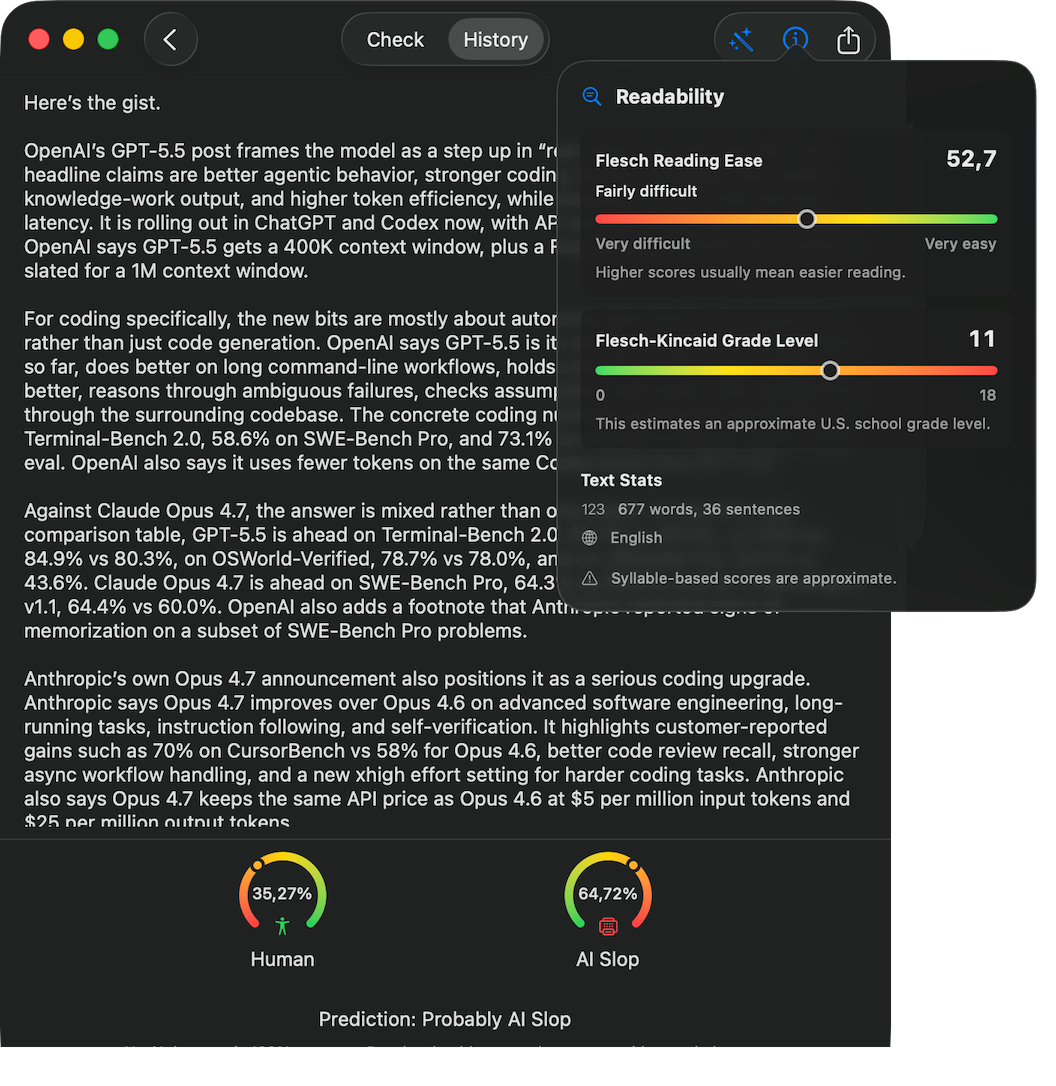
Flesch Reading Ease maps a passage to an ease-of-reading scale, where higher numbers mean easier to read. The in-app caption sums it up plainly: "Higher scores usually mean easier reading."
Flesch-Kincaid Grade Level maps the same passage to an approximate U.S. school grade. Lower grades mean simpler text; higher grades mean more complex text. The in-app caption: "This estimates an approximate U.S. school grade level."
The two formulas read the same syllable, word, and sentence counts, so the numbers move in opposite directions for the same passage. Reading Ease goes down as Grade Level goes up. That is a property of the math, not a separate signal.
What the Non-English Scores Mean
For the other six languages, Slop Or Not uses the formula that local readers and educators are most likely to recognize:
- German – Wiener Sachtextformel. Developed for German prose; reports a result on a German school-grade scale where higher numbers mean harder text.
- Spanish – Flesch-Szigriszt. A Spanish adaptation of the Flesch family; reports an ease-of-reading number where higher means easier, calibrated to Spanish syllable patterns.
- Italian – GULPEASE. Designed at the University of Rome around Italian word and sentence length; reports a 0-to-100 ease score where higher means easier.
- Swedish, Danish, Norwegian – LIX (Läsbarhetsindex). A Scandinavian readability index based on long-word frequency and average sentence length; higher numbers mean harder text.
Different formulas use different scales, so a 60 in English is not the same difficulty as a 60 in Italian or in Swedish. Compare scores within a language, not across them.
How Readability Fits Alongside AI Detection
The Readability popover sits on top of the same result screen as the AI Slop verdict. That layout is deliberate. Readability and AI detection answer different questions about the same passage.
- AI detection asks: who or what wrote this?
- Readability asks: how hard is this to read?
A passage can be high in both readability and AI suspicion. A high-school essay that reads at a middle-school grade level and scores 64 percent AI Slop is not less suspicious because it is easy to read. The two numbers compose; they do not cancel each other out.
The reverse is also worth saying explicitly. A grade-12 essay does not become "more human" because it is hard to read. Readability does not estimate authorship. Slop Or Not's AI detection is the part of the screen that does that, and it is still the part you read first when you are looking for AI Slop.
When Reading Ease and Grade Level Disagree (English)
In English, the two scores normally move in lockstep, but the syllable mix sometimes pulls them apart. A passage with short sentences and long, multisyllable words can score moderate on Reading Ease and high on Grade Level, or vice versa. When the scores diverge, treat it as a prompt to read the passage carefully.
This is most useful before you reach a verdict on a draft. A senior-level essay written at a middle-school reading ease, or a primary-school assignment at undergraduate grade level, is a signal worth a closer read. The detector flags AI Slop. The readability scores flag a mismatch between the writer and the audience the writing is supposed to reach.
Methodology Caveats
Readability runs in 7 supported languages, all on-device. The scores remain available even when language detection confidence is low, as long as a supported language is identified. If Readability shows up, the score applies to the detected language.
Every formula in the lineup is approximate. The English Flesch formulas count syllables, words, and sentences, and the in-app screen is explicit about the trade-off: "Syllable-based scores are approximate." LIX leans on long-word frequency and sentence length. GULPEASE works from word and sentence length. The exact inputs differ; the takeaway is the same. A single result is a quick gauge, not a precise measurement.
Two cross-language notes follow from the same caveat:
- Different languages use different formulas and different scales. Do not compare scores across drafts written in different languages.
- Compound words, agglutination, and vowel clusters land differently across languages. The scores still help inside one language; they are not designed for cross-language calibration.
The in-app behavior is the best authority for which language was detected and which formula applies on your device.
How to Find Readability in the App
On iPhone, run any text check from the main screen. On the result page, the Readability popover appears alongside the AI Slop gauges. Tap the readability tile to expand the full breakdown: the score (or scores, in English), the colored scale, and the word and sentence counts.
On Mac with Apple silicon, the same flow applies. The Readability popover docks beside the result column inside the app window. Slop Or Not on Mac shares the same on-device detection model and the same readability calculation as the iPhone build, so the numbers are directly comparable across the two devices for the same language.
There is no menu to enable, no preference to flip, and no upload step. The whole check, including the readability calculation, runs locally on your device.
Why On-Device Readability Matters
Most online readability checkers require pasting the text into a browser tab. That is fine for a public draft. It is not fine for a student essay, a legal brief, a medical note, or any document under a privacy or compliance rule that prohibits cloud upload.
Slop Or Not calculates readability on-device alongside the AI detection result, so no part of your text leaves the iPhone or Mac. For a teacher reviewing student work, that means a reading-level check without sending the assignment to a third-party server. For a writer, it means draft feedback without committing the text to a cloud history.
The free tier supports a limited number of checks per day on the App Store version. The readability score ships with every check on that tier; there is no paid gate around the readability fields. If you check more than the daily limit allows, that is the only place upgrade matters - the readability calculation itself stays free.
A Quick Workflow for Teachers and Students
For teachers grading assigned writing in English:
- Paste the essay into Slop Or Not.
- Note the AI verdict and confidence.
- Glance at Reading Ease and Grade Level on the same screen.
- If Grade Level disagrees with the assignment level, read the passage carefully. The disagreement is a prompt, not a verdict.
For teachers grading in German, Spanish, Italian, Swedish, Danish, or Norwegian, run the same flow and read the score that the popover labels for the detected language (Wiener Sachtextformel, Flesch-Szigriszt, GULPEASE, or LIX).
For students checking a draft before submission:
- Paste your draft.
- Confirm that the AI verdict matches your expectation.
- Compare the readability score to the level you are writing for, using the in-app scale for your language.
- Adjust if either signal is off.
For a direct check of the same workflow, paste the draft into the interactive AI essay detector. The ChatGPT detector for iPhone post goes deeper on the text-detection side, including Text Cleanup for hidden characters.
FAQ
Are the readability scores accurate enough for grading?
Every formula in the lineup is approximate by design - the in-app screen labels the English Flesch scores syllable-based and the same caveat carries to the others. A single number is a gauge, not a graded measurement. Use the scores to flag drafts that warrant a closer read; do not use them as a defensible grade input.
Do I need an internet connection?
No. The first launch of Slop Or Not downloads the on-device models. After that, both AI detection and readability scoring work offline.
Does Slop Or Not upload my text to compute the scores?
No. Readability scoring runs on-device alongside AI detection. Your text does not leave your iPhone or Mac.
Which languages are supported?
Seven languages today, with more coming in future updates: English (Flesch Reading Ease, Flesch-Kincaid Grade Level), German (Wiener Sachtextformel), Spanish (Flesch-Szigriszt), Italian (GULPEASE), Swedish, Danish, and Norwegian (LIX). The app shows the detected language in the Readability popover; if a supported language is identified, the score is available.
Can I compare scores across languages?
No. Each language uses a different formula and a different scale, so the numbers are not directly comparable. Compare scores within a single language, or use the in-app scale labels to interpret one passage at a time.
Why are Reading Ease and Grade Level different numbers for the same text?
In English, they are different Flesch formulas measuring related things. Reading Ease maps to a 0 to 100 scale; Grade Level maps to an approximate U.S. school grade. They normally move together. When they disagree, the passage is worth a closer read.
Try It
Slop Or Not is a free download on the App Store for iPhone and Mac. Readability runs on every text check, on-device, in 7 languages alongside the AI detection result. No account, no upload, and no word limit per document or per month.