

Slop or Not for Mac: On-Device AI Slop Detector App
The AI slop hits your Mac long before it hits your phone. It lands as a supplier email in Mail, a student draft in Pages, a blog hero image dropped into a Figma board, a press photo pulled into a CMS. Slop Or Not now runs natively on Mac, so you can flag AI-generated text and images on the device where the content actually arrives.
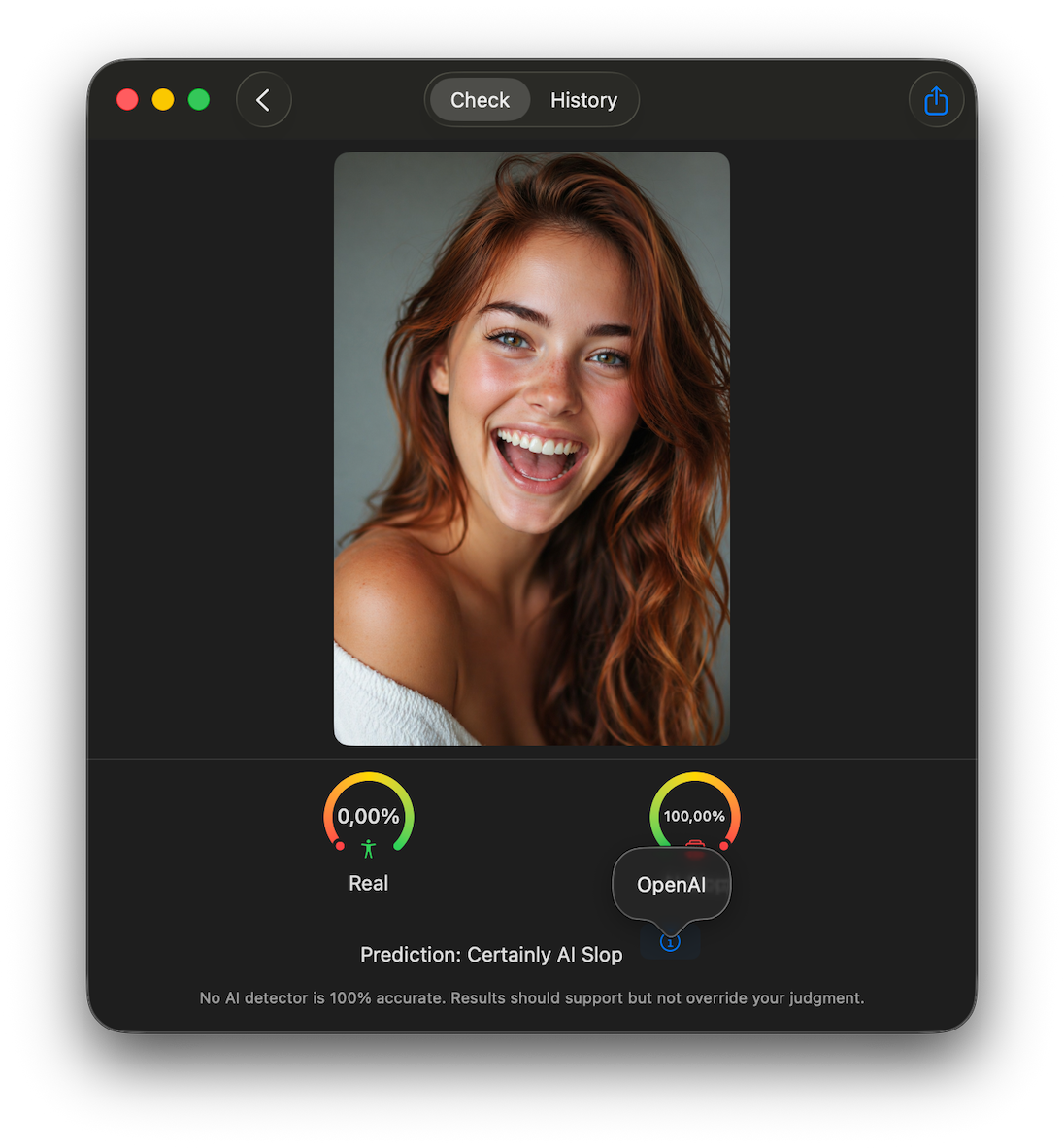
Slop Or Not for Mac is an on-device AI slop detector for the Mac App Store. It checks images for SynthID watermarks, C2PA Content Credentials, IPTC photo metadata, and an on-device AI image detection model when no readable provenance is available. It also detects AI-generated text using a custom on-device transformer. Everything runs on Apple silicon through CoreML, accelerated by the Neural Engine, and nothing leaves the Mac.
This post covers what the Mac app does, how the detection works, what the free tier gets you, and which Pro purchase options are available. It does not cover the iPhone-only features.
Key Takeaways
- Slop Or Not is available on the Mac App Store as a native app for Mac with Apple silicon.
- AI image detection reads SynthID, C2PA Content Credentials, and IPTC metadata, then falls back to an on-device AI image detection model.
- AI text detection uses a custom on-device transformer trained on millions of human and AI samples.
- Detection runs on Apple silicon through CoreML, accelerated by the Neural Engine. Text and images stay on the Mac, and there is no account to create.
- Free tier gives 3 checks a day, or 5 with a streak. Pro offers monthly, yearly, and one-time purchase options.
Slop or Not for Mac Is Now on the Mac App Store
You can download Slop Or Not for Mac on any Mac with Apple silicon. The app ships as a native Mac build, not a window-shaped iPad port. The interface uses the standard Mac toolbar and menu surface, and you can drag an image straight from Finder, Photos, or Safari into the check window.
Two workflows cover most of what people do on the Mac:
- Paste-and-check for text. Paste an essay, a press release, or a long product description. Slop Or Not analyzes it on-device and returns a verdict. There is no character limit and no daily token budget for the analysis itself.
- Drag-and-drop for images. Drop a photo into the window. Slop Or Not reads the embedded credentials first, then runs the on-device image detector if no credentials are present.
Reading SynthID, C2PA, and IPTC on Mac
SynthID, C2PA Content Credentials, and IPTC photo metadata are common ways to mark an image as AI-generated. Slop Or Not for Mac reads those signals first and separates them from the fallback image-model score. The browser-based AI watermark detector runs the same provenance-first check online.
C2PA stands for the Coalition for Content Provenance and Authenticity. OpenAI ships C2PA on every image generated by ChatGPT and DALL-E. Adobe Firefly and Microsoft Designer ship it too. The credential is a signed manifest embedded in the file that records what tool produced the image, when, and what edits were applied later.
Google Gemini images may carry SynthID. Unlike ordinary metadata, SynthID is embedded directly into the image, so screenshots and normal exports do not strip it in the same easy way. Heavy repeated edits or severe recompression can still make a SynthID check inconclusive.
IPTC photo metadata is older and more widely supported. Some generators and editing tools write IPTC DigitalSourceType values to mark synthetic media. Many camera and editing tools read and respect those fields.
When a readable watermark or credential is present, Slop Or Not reports a confident verdict. The brand's public accuracy figures put detection of watermarked images at 100 percent in internal tests, with the standard caveat that results can vary as new evasion methods emerge.
How Slop or Not Catches AI Images Without Watermarks
C2PA and IPTC metadata can get stripped. Screenshots, re-encodes, and aggressive social-media compression often remove file credentials, and an attacker who wants to slip AI content past a check has every reason to remove them. SynthID is harder to remove because it is embedded in the image itself, but if no readable provenance remains, the image model checks the pixels instead.
Slop Or Not ships an on-device AI image detection model in the Mac app. It runs locally on Apple silicon with Neural Engine acceleration and checks pixel-level signals that do not depend on metadata. A verdict takes seconds. It catches output from ChatGPT image generation, Google Gemini, Midjourney, and other modern generators when the file has no readable provenance.
In internal tests, the image model reaches around 94 percent accuracy on AI-generated images that have no metadata or watermark to read. Accuracy drops as new generators appear and as humanizing tricks evolve, which is why the model updates over time. For a deeper look at the no-provenance case, see the post on detecting Nano Banana 2 images on iPhone. The same detection pipeline runs in the Mac app.
AI Text Detection on Mac With No Word Limits
AI text detection on the Mac uses a custom transformer that Slop Or Not trained in-house and ships as a CoreML model inside the app bundle. The model targets English text and is tuned for the kinds of writing people actually paste into a checker: essays, blog posts, emails, product descriptions, social posts.
Compared with a browser-based AI text detector, the Mac workflow has a few practical differences:
- No word-count limits. Cloud detectors meter usage and ask you to chop a long document into pieces. Slop Or Not analyzes a full document in one pass.
- No upload. A teacher checking a draft, a journalist checking a tip, or a lawyer checking a discovery document never sends the text to a third party.
- No account. Open the app and run a check. There is nothing to sign in to.
In internal tests the text detector reaches around 95 percent accuracy. Results vary on text that has been deliberately humanized, which is why the app also includes a Text Cleanup utility that strips zero-width spaces, homoglyphs, and other hidden tricks before the check runs. There is more on the text workflow in the ZeroGPT comparison and iPhone ChatGPT detector posts.
Why the AI Slop Detector Runs On-Device on Mac
On Mac, the AI slop detector runs entirely on Apple silicon using CoreML, accelerated by the Apple Neural Engine. The Neural Engine is the dedicated machine-learning accelerator built into every Apple silicon chip from the M1 onwards. CoreML is Apple's framework for running machine-learning models on that hardware from a sandboxed app.
That hardware path matters for two reasons. The first is speed, which is what makes paste-and-check usable as a workflow. The second is the privacy guarantee. The model weights ship inside the app bundle, the pixels and the text never leave the sandbox, and there is no server-side cache for a third party to compromise or subpoena.
That guarantee is the main thing the Mac build adds for the journalist, the teacher, the lawyer, and the medical writer. It is also the reason cloud detectors are not a substitute when the document is sensitive.
Pricing: Free or Pro
Slop Or Not for Mac is freemium: the download is free, the detection models live in the app bundle, and the free tier gives:
- 3 checks a day by default, across text and images combined.
- 5 checks a day with a streak, which kicks in once you have used the app on consecutive days.
If you need more headroom, Pro lifts the daily cap. You can pay three ways:
- A rolling monthly subscription.
- A yearly subscription, billed once a year for the same Pro access.
- A one-time Pro purchase that covers the app for as long as it ships.
The one-time Pro purchase suits power users and small teams who want a fixed cost. It also supports Apple's family sharing feature, so one purchase can be used by up to 6 family members. There is no enterprise tier and no separate cloud subscription, because the detection itself runs on the Mac you already own.
Frequently Asked Questions
Does Slop Or Not for Mac run on Intel Macs? No. The detection models target the Apple Neural Engine on Apple silicon, so the Mac app requires an M-series chip (any Apple silicon Mac shipped from late 2020 onwards).
Does it run offline? Yes. After the initial download from the Mac App Store, every detection check runs against the local CoreML models. No network call is required to analyze text or images.
How accurate is it on Mac? Internal tests put detection of watermarked images at 100 percent, the image model at around 94 percent on AI images without watermarks, and the text detector at around 95 percent. Accuracy can vary with new AI models and with humanizing tricks designed to evade detection.
Does Slop Or Not upload my files? No. Text and images stay inside the app sandbox on the Mac. There is no cloud processing step and no account, which is why Slop Or Not works for confidential documents and images that cannot leave your device. See the privacy policy for the full data-handling statement.
Can I share Pro between iPhone and Mac? Pro is tied to the Apple ID that bought it and follows the standard Mac App Store and App Store family-sharing rules. If your iPhone and Mac share the same Apple ID, the same Pro access covers both.
Get the Mac Build
Download Slop or Not for Mac from the Mac App Store and run your first check free. If you have not used the iPhone app, the ChatGPT detector for iPhone post covers the same workflow on the smaller screen, and the Forensically comparison covers the image-detection trade-offs against a browser-based forensics tool.
The short version: install it, drag in a file, and stop guessing.