How to Detect ChatGPT-Generated Images: 3 Reliable Checks
To detect a ChatGPT-generated image, check three things in order: C2PA Content Credentials, the SynthID watermark, and the pixels themselves. Images that still carry OpenAI source markers are identified with 100% accuracy per internal tests; stripped images fall back to an on-device model at ~90%. Counting fingers stopped working - modern generators render hands, text, and faces cleanly enough that your eyes are not a reliable detector.
Start by reading OpenAI's own source markers, not a generic pixel guess. OpenAI-generated images now include C2PA metadata and SynthID watermarks, and those signals answer a narrower question: did this file likely come from OpenAI tools? Slop or Not reads those signals on iPhone and Mac, then falls back to an on-device image model when source markers are missing. Want a same-second answer without installing anything? The ChatGPT image detector online tool runs the same check in a browser.
This guide walks through how to check a ChatGPT image, what changed with OpenAI's C2PA and SynthID support, and why OpenAI Verify is not a universal AI image checker. For the provider-scope explainer, read OpenAI vs Gemini image verifiers.
Want to check one image from a browser first? Try the free online AI image detector. Online checks run on Numen's private Mac server, not an outside AI company's. Use the iPhone or Mac app when the image needs to stay on-device.
Key Takeaways
- Slop or Not flags images from ChatGPT Images 2.0 / GPT-Image-2 (launched 2026-04-21), plus older DALL-E 3 and GPT-Image-1 outputs.
- OpenAI images can carry C2PA Content Credentials and SynthID watermarks. Slop or Not checks both when the file still exposes them.
- Images with source markers stripped or degraded fall back to the on-device AI model at ~90% accuracy per internal tests.
- OpenAI Verify checks OpenAI-origin signals. Gemini verification currently recognizes Google AI signals, so neither tool is a universal SynthID detector.
- The full native-app check runs locally on Apple silicon, accelerated by the Neural Engine, on both iPhone and Mac. Nothing uploads and no account is needed.
- The same Slop or Not pipeline also catches AI images from Google Gemini, Midjourney, Stable Diffusion, Adobe Firefly, and Microsoft Designer.
- Slop or Not is available as native iPhone and Apple silicon Mac apps, plus a free web checker. Native checks stay on-device; web checks run on Numen's private Mac server, not an outside AI company's.
How to Detect a ChatGPT Image on iPhone
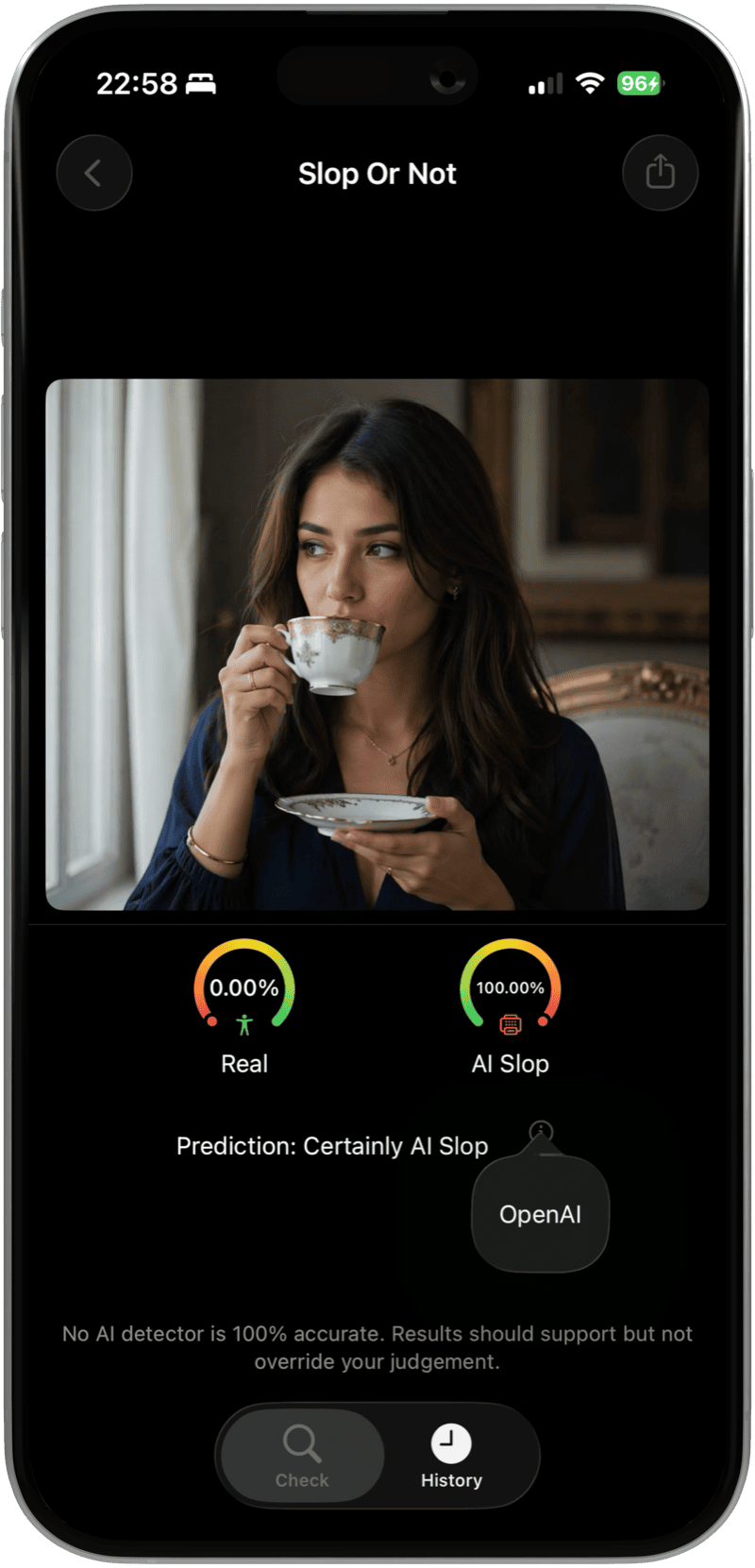
Tap Share on any image and pick Slop or Not. The verdict lands in under a second. If OpenAI source data is on the file, the app shows the source evidence and an AI verdict. If the C2PA metadata was stripped or the SynthID signal is inconclusive, the on-device AI model steps in at ~90% accuracy per internal tests.
From Photos, Safari, or Any App
- Open the image in Photos, Safari, or any app that supports sharing.
- Tap Share and pick Slop or Not from the action list.
- The app opens with the image preloaded. Tap Check.
- The result shows right away. If readable OpenAI source data is present, you will see the source evidence and generator name.
From Inside the App
- Install Slop or Not from the App Store. iOS 17 or later.
- Open the app once to pull the on-device models. A one-time setup of a few hundred megabytes.
- Tap Select Photo to pick from your library, or Paste image to paste from the clipboard.
- Tap Check to see the decision. Source details appear when readable C2PA or SynthID evidence is available.
- Use History to revisit any prior check.
Tested on iPhone 17 Pro with the current App Store build of Slop or Not, April 2026.
Check the original image, not a screenshot. Screenshots can strip C2PA/IPTC metadata, and watermark evidence can be weakened or inconclusive, so Slop or Not falls back to the on-device AI model.
How to Detect a ChatGPT Image on Mac
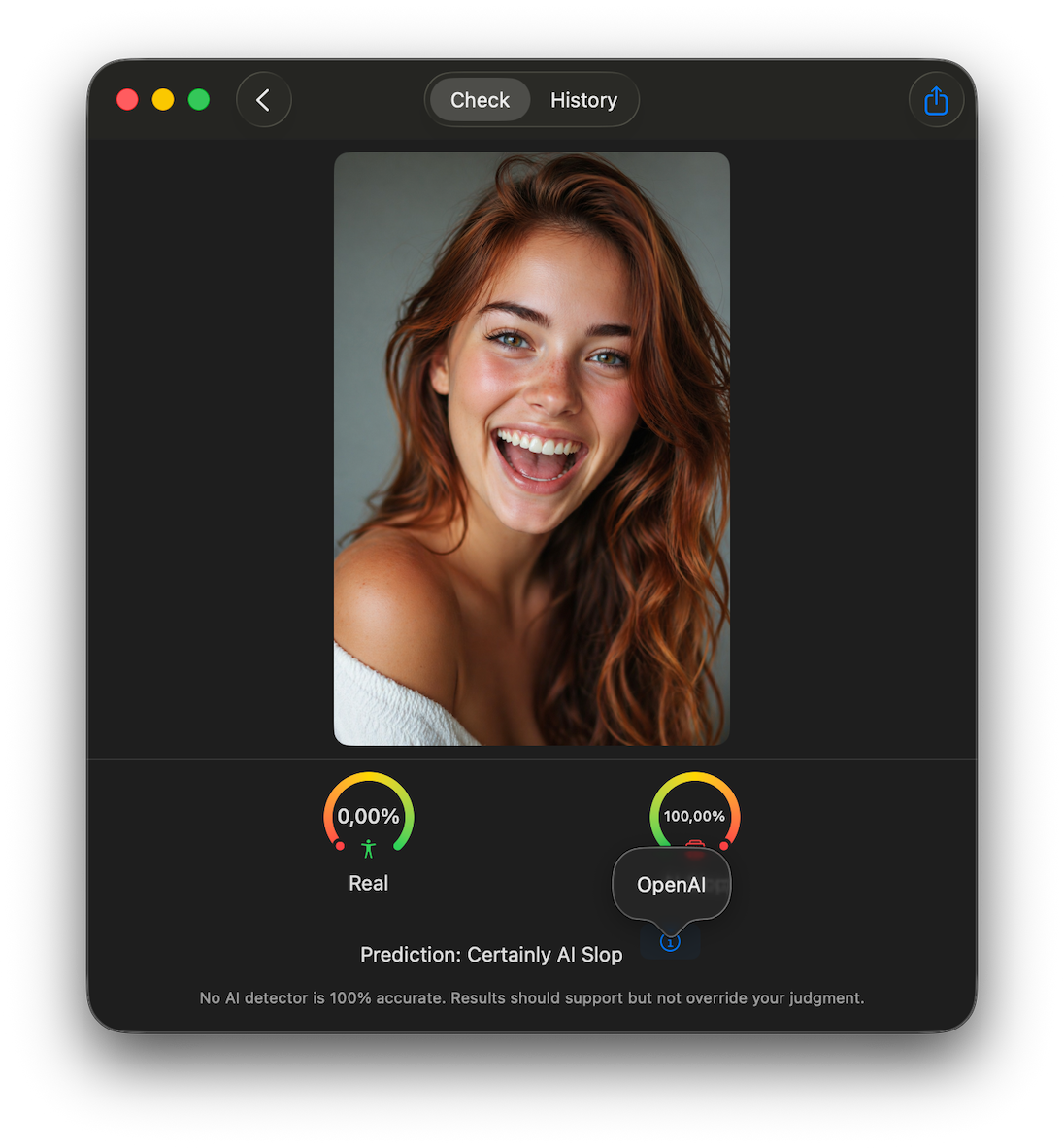
Slop or Not for Mac checks source data before it guesses. It reads OpenAI C2PA metadata and SynthID signals locally, checks other source markers such as Google SynthID when relevant, then runs its on-device image model when no readable source data is available. The Mac app is available for Apple silicon Macs through the Mac App Store.
From Finder, Photos, or Safari on Mac
- Install Slop or Not from the Mac App Store on an Apple silicon Mac.
- Open the app once so the on-device models are ready.
- Drag an image from Finder, Photos, Safari, or your desktop into the check window.
- Run the check. If the image still exposes readable OpenAI source data, the Mac app shows the OpenAI source badge.
- If no readable credential or watermark is available, Slop or Not falls back to the local image model instead of uploading the file.
The Mac workflow is useful when the file starts on your laptop: a downloaded ChatGPT image, a blog hero dropped into a CMS, a product photo in Finder, or a source image a journalist needs to verify before publishing. For the broader desktop workflow, read the Slop or Not for Mac guide.
Can ChatGPT Detect AI-Generated Images on Its Own?
ChatGPT with Vision can look at an image and guess whether it is AI-generated, but that is not the same as checking source data. OpenAI Verify is the official route for OpenAI source signals. It checks supported C2PA metadata and SynthID watermarks associated with OpenAI tools.
That scope matters. OpenAI Verify does not tell you whether a file came from Gemini or another provider. Gemini verification has the opposite boundary: it currently recognizes Google AI signals, not every provider's SynthID. Slop or Not is useful when the image source is unclear because it checks source markers first, then uses visual detection when those markers are missing.
Does ChatGPT Watermark Its Images?
Yes. OpenAI says images generated with ChatGPT, Codex, and the OpenAI API include both C2PA metadata and SynthID watermarks. C2PA can carry richer context about the file. SynthID is embedded into the image itself and may survive some transformations that remove metadata. Our guide to checking an image for an AI watermark covers how to read each of those signals on a file from any generator, not just OpenAI's.
For the cleanest check, use the original downloaded image. Screenshots and social uploads can strip C2PA/IPTC metadata, and heavy edits or recompression can weaken watermark evidence. If the strongest source signal is missing, Slop or Not falls back to the image model.
Why GPT-Image-2 Broke the Old Visual Tells
GPT-Image-2 is OpenAI's current ChatGPT Images 2.0 model, released on 2026-04-21 as the successor to GPT-Image-1.5. It renders 4K photos and keeps character likeness across up to 8 images from a single prompt. Text on labels and signs comes out clean. Hands and anatomy land right more often than they miss. OpenAI's launch post frames it as a step change in image generation.
The old "count the fingers" trick no longer works reliably against GPT-Image-2 or its peers. An OpenAI C2PA and SynthID check is the honest read, and Slop or Not does it on your device without sending the file anywhere.
Which ChatGPT Image Models Slop or Not Flags
The detection surface as of April 2026:
- ChatGPT Images 2.0 / GPT-Image-2: OpenAI C2PA and SynthID signals plus on-device AI fallback. 100% with a signed C2PA credential, a strong source signal when SynthID is readable, ~90% without.
- GPT-Image-1 and GPT-Image-1.5: OpenAI C2PA and SynthID signals plus on-device AI fallback. 100% with a signed C2PA credential, a strong source signal when SynthID is readable, ~90% without.
- DALL-E 3 in ChatGPT or the API: OpenAI C2PA and SynthID signals plus on-device AI fallback. 100% with a signed C2PA credential, a strong source signal when SynthID is readable, ~90% without.
- Sora still frames: OpenAI source signals when present. 100% with a signed C2PA credential; SynthID-only reads are strong evidence, not proof.
- Google Gemini, including Nano Banana 2: Google SynthID plus any available Content Credentials, then on-device AI fallback. Signed credentials are deterministic when present; readable SynthID is a strong source signal, and missing source markers fall back to ~90%.
- Adobe Firefly and Microsoft Designer: Content Credentials. 100% with credentials.
- Midjourney: IPTC tags plus on-device AI model. ~90% per internal tests.
- Stable Diffusion (default tooling): on-device AI model only. ~90% per internal tests.
Accuracy figures are based on internal testing. Results vary with new model releases and with evasion methods designed to defeat detectors. We ship model updates as new generators appear. See our Nano Banana 2 detection guide for an example of how a new generator gets folded in.
Why OpenAI Verify Is Not Enough for Unknown Images
OpenAI Verify is the right official tool when the question is "did OpenAI make this image?" It is not a universal SynthID detector. Gemini verification has the same kind of boundary in the other direction: it currently recognizes Google AI signals.
Most real checks start without a reliable source label. A file arrives from a social post, classroom submission, product listing, or private message. In that workflow, use a detector that checks several evidence layers instead of asking one provider's verifier to answer every source question. Slop or Not reads SynthID, C2PA/IPTC metadata, and visual image signals in one pass. The longer explainer is here: OpenAI vs Gemini image verifiers.
What Happens When Source Data Is Missing
C2PA/IPTC metadata can get stripped. Social networks re-encode images for size. Screenshots skip ordinary metadata entirely. SynthID is different: it is embedded into the image, so a screenshot does not remove it in the same easy way. If an image arrives without valid metadata or a readable watermark, it falls into the on-device AI detector.
That is why metadata-removal tools are not the whole story. If your question is narrower, read whether removing AI metadata hides AI-generated images before treating a clean metadata read as a clean image.
The model runs through Apple's Core ML framework on Apple silicon, accelerated by the Neural Engine on iPhone and by the Neural Engine or GPU on Mac. It is compact enough to ship inside the app and run offline, and it was trained on millions of labeled real and AI-generated samples. Internal testing puts accuracy at ~90% on non-watermarked AI images across DALL-E 3, GPT-Image, Midjourney, Stable Diffusion, Gemini, and Adobe Firefly outputs.
The model catches the same visual fingerprints experienced human checkers learn to spot: too-perfect lighting across scenes, uncanny repeated textures, subtly wrong anatomy, GPU-smooth gradients. It does that faster than a human reviewer and across far more generators.
Accuracy is based on internal testing. Results vary with new models and evasion methods designed to defeat detectors. Each app update retrains against the newest image generators.
Why Check On-Device Instead of an Online Detector
Cloud detectors put the burden of privacy on the uploader. Most require an account, cap checks per day, and send the photo to a server for analysis. That is a hard no for a journalist verifying an image from a source, a lawyer under attorney-client privilege, a doctor reviewing a scan, or anyone checking an image that may not be theirs to share.
Slop or Not runs the detection on the iPhone or Mac itself:
- Nothing uploads. The image and the verdict stay on the device.
- No account, no login. Open the app, check an image, close the app.
- 3 free checks per day. Pro removes the daily cap.
- Offline capable. The model runs without a connection once it's been downloaded on first launch.
- Native Mac app. The Mac App Store build uses the same no-upload detection path, so journalists and lawyers who work primarily on a laptop get the same privacy model without a cloud round-trip.
Need the browser tool instead of the native app? Use the ChatGPT image detector page for a quick online check. For a head-to-head against a popular browser forensics tool, read Forensically vs Slop or Not. Teachers who run image checks alongside essay checks can also see the free ChatGPT detector for iPhone guide.
FAQ
Does Slop or Not detect GPT-Image-2 images?
Yes. GPT-Image-2 outputs can carry OpenAI C2PA metadata and SynthID watermarks. Slop or Not reads those signals on-device for a verdict based on source data. If an image lost its metadata or the watermark is inconclusive, the on-device AI model catches it at ~90% accuracy per internal testing.
Can ChatGPT detect AI-generated images itself?
ChatGPT Vision can guess, but a narrated guess is not the same as checking where the image came from. OpenAI Verify checks supported OpenAI C2PA and SynthID signals. Slop or Not checks those signals, other source evidence, and an on-device classifier when the source is unclear.
Are ChatGPT-generated images private?
OpenAI's data policy covers how ChatGPT stores your prompt and the generated file on their side. C2PA metadata in the image does not include your prompt or user ID. It names the generator and the date, nothing about you. Removing that metadata does not retroactively make the image private, but it can remove one of the easiest source checks.
Does the check actually run on my iPhone or Mac?
Yes. The entire check runs locally on Apple silicon, accelerated by the Neural Engine on iPhone and by the Neural Engine or GPU on Mac. Your image never leaves the device. The app needs a connection only for the initial model download.
What if someone screenshots or re-encodes the image?
C2PA/IPTC metadata is often stripped, so the strongest source check may disappear. SynthID is embedded into the image and can survive more than ordinary metadata, but heavy edits or severe recompression can still make the signal inconclusive. For the cleanest result, check the original file rather than a screenshot.
Which image generators does the app recognize?
ChatGPT (DALL-E 3, GPT-Image-1, GPT-Image-1.5, GPT-Image-2 / ChatGPT Images 2.0), Google Gemini including Nano Banana 2, Adobe Firefly, Microsoft Designer, Midjourney, and Stable Diffusion. See the list above for whether each one uses C2PA/IPTC metadata, SynthID, the image model, or a mix of those paths.
Is Slop or Not free?
Yes. Free users get 3 checks per day, which can increase with regular use. Pro removes the cap and includes Incognito Mode and Text Cleanup.
Can I use this in a classroom?
Yes. Teachers pick it because nothing leaves the phone. Student work is checked on the teacher's own iPhone, so no essay, screenshot, or image gets shipped to a third-party server. For AI-written essays, Slop or Not reports 95% accuracy on text per internal testing.
Is Slop or Not a ChatGPT image checker, or a full AI image detector?
Both. The same pipeline reads OpenAI source markers for ChatGPT image checks and runs the on-device AI model on outputs from other generators (Gemini, Midjourney, Stable Diffusion, Firefly, Designer) for a ~90% probability verdict. Use the AI image detector when the source model is unknown.
Can I use Slop or Not to detect ChatGPT images on Mac?
Yes. Slop or Not is available on the Mac App Store for Apple silicon Macs. It reads OpenAI C2PA and SynthID signals locally and uses the on-device AI image model when source markers are missing or inconclusive. That's a private way to check a ChatGPT image on Mac when you do not want to upload the file. Prefer a browser check instead? Use the ChatGPT image detector online tool.
Catch ChatGPT Images Privately on Your iPhone or Mac
ChatGPT Images 2.0 is the hardest AI image model to spot by eye. The quickest honest check is the file's OpenAI source markers, and the only way to read them without uploading the image is on-device.
Start with the online AI image detector for a browser check. For private on-device checks, download Slop or Not free. It reads OpenAI C2PA and SynthID signals locally on iPhone and Mac, falls back to an on-device image model when source markers are missing, and never sends your photos anywhere.
Privacy: What On-Device Detection Means Here
Slop or Not is built by a two-person team in the EU. We collect no personal data on image checks. Nothing about the image you verify is logged, transmitted, or stored on our side. The design lets professionals use the app on material they could not otherwise check in the cloud:
- Journalists verifying a source image during breaking news without tipping off a platform
- Lawyers handling evidence under attorney-client privilege
- Healthcare workers reviewing images that cannot leave the device under HIPAA considerations
- Teachers scanning student-submitted work without shipping it to a third party
Because the detection happens on your device, the app is GDPR and CCPA compliant by design. Read the full Privacy Policy for details.