



Slop Or Not Logo

On-device checks in Terminal

AI Detector CLI for Claude, Codex, Hermes Agent, OpenClaw

The slop CLI runs Slop or Not's AI text detector, AI image detector, readability analyzer, and cleanup tool from your Mac terminal. It returns JSON for Claude, Codex, Hermes Agent, OpenClaw, Cursor, scripts, and editors.

Moving from a cloud detector like ZeroGPT or GPTZero? Pipe in a draft, a screenshot, or a local file. Slop or Not scores it locally and never uploads it.

Download on the App Store
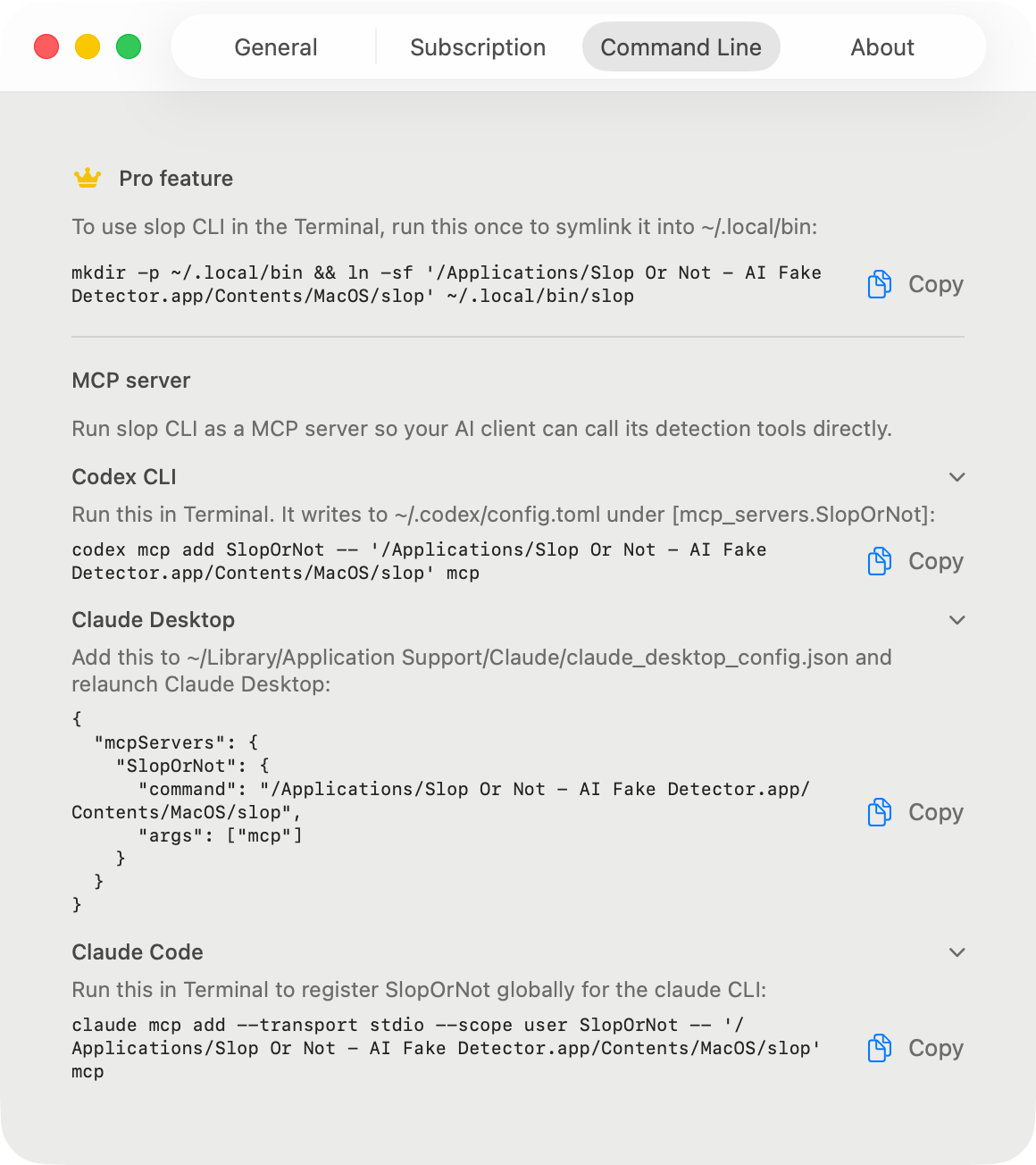
Slop or Not command line setup screen on Mac
The binary is bundled inside the signed Slop or Not Mac app.
Runs locally
Text, image, readability, and cleanup checks stay on your Mac.
Outputs JSON
Use --json when scripts or agents need stable results.
Requires Pro
The CLI ships in the Mac app and unlocks with Pro or Lifetime.

Setup

How do I install the Slop or Not CLI?

Open Slop or Not for Mac once, activate Pro, then symlink the bundled binary into a PATH directory. The symlink makes the command easier for your shell and local AI tools to find.

mkdir -p ~/.local/bin
ln -sf '/Applications/Slop Or Not - AI Fake Detector.app/Contents/MacOS/slop' ~/.local/bin/slop
export PATH="$HOME/.local/bin:$PATH"
slop status

Command reference

What can the Slop or Not CLI do?

The command surface is small on purpose: status, text, image, readability, cleanup, and MCP.

slop status

Check your install

Confirms the CLI can find the app bundle and reports whether Pro is active.

View command and response

Run

slop status --json

Returns

{
  "localCachePro" : true,
  "pro" : true,
  "version" : "1.0.9"
}
slop text

Score AI text

Reads UTF-8 text from stdin and returns the same on-device AI probability used by the Mac app, plus readability metrics.

View command and response

Run

pbpaste | slop text --json

Returns

{
  "detectedLanguage" : "en",
  "detection" : {
    "result" : {
      "_0" : 0,
      "_1" : { "real" : {} }
    }
  },
  "readability" : {
    "detectedLanguage" : "en",
    "languageConfidence" : 0.9996,
    "scores" : [
      { "kind" : "fleschReadingEase", "direction" : "higherIsEasier", "label" : "<label>", "value" : 75.17 },
      { "kind" : "fleschKincaidGradeLevel", "direction" : "gradeLevel", "value" : 5.51 }
    ],
    "selectedLanguage" : "en",
    "stats" : { "wordCount" : 66, "sentenceCount" : 6, "syllableCount" : 94 },
    "warnings" : []
  },
  "sentenceCount" : 6
}
slop readability

Analyze readability

Returns Flesch scores in English and the supported language-specific formula for six other languages.

View command and response

Run

cat draft.md | slop readability --json

Returns

{
  "readability" : {
    "detectedLanguage" : "en",
    "languageConfidence" : 0.9996,
    "scores" : [
      { "kind" : "fleschReadingEase", "direction" : "higherIsEasier", "label" : "<label>", "value" : 88.54 },
      { "kind" : "fleschKincaidGradeLevel", "direction" : "gradeLevel", "value" : 2.65 }
    ],
    "selectedLanguage" : "en",
    "stats" : { "wordCount" : 35, "sentenceCount" : 5, "syllableCount" : 46 },
    "warnings" : []
  }
}
slop cleanup

Clean hidden text tricks

Removes zero-width spaces, homoglyphs, fancy punctuation, and other formatting tells before another check.

View command and response

Run

pbpaste | slop cleanup --json

Returns

{
  "cleanedText" : "<cleaned_text>",
  "detectedLanguage" : "en",
  "invisibleCounts" : [
    { "count" : 1, "kind" : "<invisible_character>" }
  ],
  "punctuationCounts" : [
    { "count" : 1, "kind" : "<punctuation_replacement>" }
  ],
  "homoglyphCounts" : [],
  "britishMappings" : []
}
slop image

Detect AI images

Checks piped JPEG, PNG, HEIC, or WebP image bytes locally, with optional OCR for screenshots.

View command and response

Run

slop image --json < ~/Desktop/screenshot.png

Returns

{
  "detection" : {
    "result" : {
      "_0" : 0.80,
      "_1" : { "most_likely_ai_slop" : {} }
    }
  }
}
slop mcp

Start the MCP server

Exposes Slop or Not tools to Claude, Codex, Hermes Agent, OpenClaw, Cursor, and other MCP clients over stdio.

View command and response

Run

slop mcp --print-config

Returns

{
  "clients": [
    "Claude Desktop",
    "Claude Code",
    "Codex CLI",
    "Hermes Agent",
    "OpenClaw",
    "Cursor"
  ],
  "tools": [
    "detect_text",
    "analyze_readability",
    "clean_text",
    "detect_image",
    "score_image",
    "slop_status"
  ]
}

Fast paths

Common terminal workflows

These are the commands most people reach for first. Each one reads local input and prints a local result.

How do I score AI text from Terminal?

Copy a draft, pipe it into slop text, and read the JSON verdict. Add --json when another tool needs stable output.

pbpaste | slop text --json

How do I check readability?

Readability is separate from AI detection. Use it when you need a reading-level check without sending text to a web tool.

cat draft.md | slop readability --json

How do I clean hidden AI fingerprints?

Text Cleanup strips invisible characters, homoglyphs, and spacing tricks. It does not rewrite the text.

pbpaste | slop cleanup --json

How do I check an image file?

Use slop image for screenshots, product shots, dating profile photos, and other files you want checked locally.

slop image --json < ~/Desktop/screenshot.png

Local API

Can I use the CLI as a local AI detector API?

For local automation, yes. The CLI reads stdin or local files and returns JSON, so scripts and editors can treat it like an AI detector API without uploading text or images to a cloud endpoint. It is not a hosted HTTP API; the Mac app runs the check on the machine that calls the command.

pbpaste | slop text --json
slop image --json < ~/Desktop/source-photo.png

MCP from CLI

How do I start MCP from the CLI?

The MCP server is a CLI subcommand. Run it directly when your MCP client asks for a command, or when you are debugging setup.

slop mcp