

slop_statusCheck app and Pro status
Confirms the app is installed, the binary can run, and Pro is active before the agent starts a workflow.
View payload and result
Tool input
{}Result shape
{
  "pro": true,
  "version": "1.0.9"
}On-device AI detector scoring
The Slop or Not MCP server lets Claude, Codex, Hermes Agent, OpenClaw, Cursor, and other agents call a local AI text detector, AI image detector, readability analyzer, and cleanup tool on your Mac.
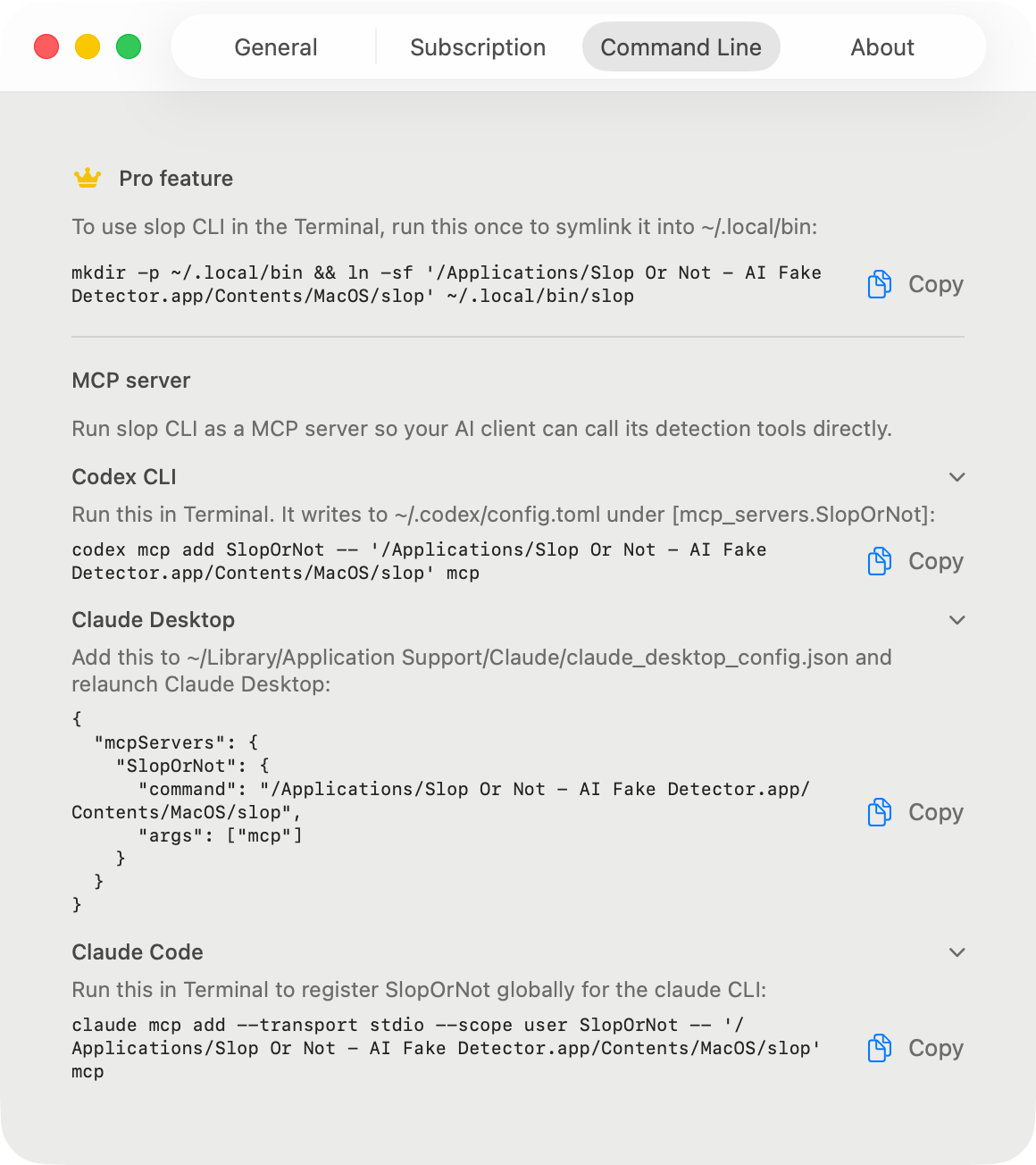
Point your MCP client at the bundled slop mcp command. With Pro, Claude, Codex, Hermes Agent, OpenClaw, Cursor, and other agents can keep running local checks without per-call API metering.


Client setup
Install the Mac app, activate Pro, then use the app-bundle snippet for your client. Claude, Codex, Hermes Agent, OpenClaw, and Cursor all point at the same local server.
claude mcp add --transport stdio --scope user SlopOrNot -- "/Applications/Slop Or Not.app/Contents/MacOS/slop" mcp{
"mcpServers": {
"SlopOrNot": {
"command": "/Applications/Slop Or Not.app/Contents/MacOS/slop",
"args": ["mcp"]
}
}
}[mcp_servers.SlopOrNot]
command = "/Applications/Slop Or Not.app/Contents/MacOS/slop"
args = ["mcp"]mcp_servers:
SlopOrNot:
command: "/Applications/Slop Or Not.app/Contents/MacOS/slop"
args: ["mcp"]openclaw mcp set slopornot '{"command":"/Applications/Slop Or Not.app/Contents/MacOS/slop","args":["mcp"]}'{
"mcpServers": {
"SlopOrNot": {
"command": "/Applications/Slop Or Not.app/Contents/MacOS/slop",
"args": ["mcp"]
}
}
}Tool reference
The server provides six tools for the checks agents usually need: status, text detection, readability, cleanup, image detection, and raw image scoring.
slop_statusConfirms the app is installed, the binary can run, and Pro is active before the agent starts a workflow.
Tool input
{}Result shape
{
"pro": true,
"version": "1.0.9"
}detect_textScores a passage with the on-device text detector and returns a local AI verdict, score, and readability metrics.
Tool input
{
  "text": "<text>",
  "include_readability": true,
  "language_code": "en"
}
Result shape
{
  "kind": "result",
  "verdict": "real",
  "score": 0.0,
  "language": "en",
  "sentence_count": 6,
  "generator": null,
  "readability": {
    "language": "en",
    "language_confidence": 0.9996,
    "scores": [
      { "kind": "fleschReadingEase", "value": 75.18 },
      { "kind": "fleschKincaidGradeLevel", "value": 5.51 }
    ],
    "stats": { "word_count": 66, "sentence_count": 6 },
    "warnings": [],
    "avg_words_per_sentence": 11,
    "word_count": 66,
    "sentence_count": 6
  }
}analyze_readabilityComputes reading-level metrics without running AI detection.
Tool input
{
  "text": "<text>",
  "language_code": "en"
}
Result shape
{
  "language": "en",
  "language_confidence": 0.9996,
  "scores": [
    { "kind": "fleschReadingEase", "value": 88.54 },
    { "kind": "fleschKincaidGradeLevel", "value": 2.65 }
  ],
  "avg_words_per_sentence": 7,
  "sentence_count": 5,
  "word_count": 35,
  "warnings": []
}clean_textStrips zero-width characters, homoglyphs, and fancy punctuation before the next detection pass.
Tool input
{
  "text": "<text>",
  "remove_invisibles": true,
  "remove_punctuation": true,
  "remove_homoglyphs": true
}
Result shape
{
  "cleaned_text": "<cleaned_text>",
  "language": "en",
  "removed_invisibles": 1,
  "punctuation_replacements": 1,
  "homoglyphs_replaced": 0,
  "british_substitutions": 0
}detect_imageChecks JPEG, PNG, HEIC, or WebP image bytes locally with C2PA and IPTC provenance reads and an on-device model fallback.
Tool input
{
  "image_base64": "<base64>",
  "recognize_text": true
}
Result shape
{
  "kind": "result",
  "verdict": "most_likely_ai_slop",
  "score": 0.80,
  "generator": null,
  "recognized_text": null,
  "recognized_sentence_count": null
}score_imageReturns the raw OmniAID image score when an agent needs the model signal without the full image-detection response.
Tool input
{
  "image_base64": "<base64>"
}
Result shape
{
  "raw_slop_score": 0.690673828125
}
Verify
After restart, ask your agent to run slop_status. The expected result is a tool call that reports the local app and Pro state without an error.
{
  "pro": true,
  "version": "1.0.9"
}Troubleshooting
GUI agents can launch outside your login shell, where command names may not resolve. The snippets use the signed app-bundle path so each client starts the same bundled Slop or Not binary.
Local API
For agent workflows, yes. MCP gives Claude, Codex, Hermes Agent, OpenClaw, Cursor, and other clients a local tool interface instead of a hosted AI detector API. The client sends text or image data to the bundled Mac binary over stdio, and the check runs on your Mac.
Loop with agents
The agentic AI Humanizer skill can run core rewriting and voice matching without Slop or Not. Connect it to Slop or Not with Pro active when you want MCP tools to score a baseline, run Text Cleanup before and after humanization, re-score with the on-device AI detector, and show cleanup stats. Your writing sample steers the rewrite; Slop or Not supplies local AI detector measurement.
Slop or Not returns a probability verdict, not proof of authorship. Results can vary with new AI models, short passages, and writing that was heavily edited by a human.