

slop_status检查 app 和 Pro 状态
在 agent 开始工作流前,确认 app 已安装、二进制文件可以运行,并且 Pro 已启用。
查看负载和结果
工具输入
{}结果结构
{
"pro": true,
"version": "1.1.1"
}设备端 AI 检测评分
Slop or Not MCP 服务器让 Claude、Codex、Hermes Agent、OpenClaw、Cursor 和其他 agent 可以在你的 Mac 上调用本地 AI 文本检测、AI 图片检测、可读性分析和清理工具。
将你的 MCP 客户端指向内置的 slop mcp 命令。使用 Pro 后,Claude、Codex、Hermes Agent、OpenClaw、Cursor 和其他智能体可以持续运行本地检测,不受按次 API 计量限制。


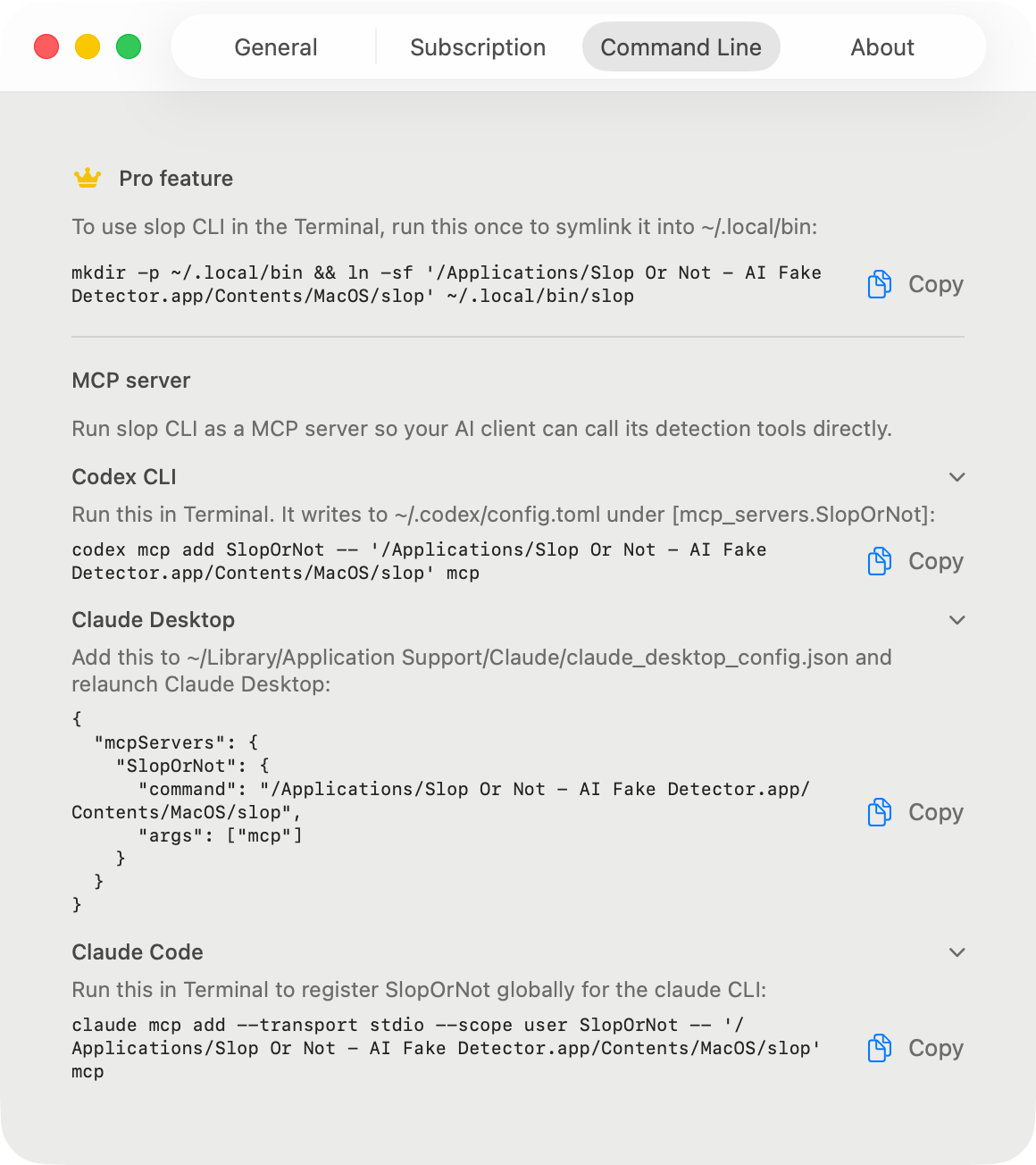
客户端设置
安装 Mac 应用,激活 Pro,然后为你的客户端使用应用包代码片段。Claude、Codex、Hermes Agent、OpenClaw 和 Cursor 都指向同一个本地服务器。只需设置一次,之后每个代理会话都会复用它,无需重新安装,也无需重新登录。
claude mcp add --transport stdio --scope user SlopOrNot -- "/Applications/Slop Or Not.app/Contents/MacOS/slop" mcp{
"mcpServers": {
"SlopOrNot": {
"command": "/Applications/Slop Or Not.app/Contents/MacOS/slop",
"args": ["mcp"]
}
}
}codex mcp add SlopOrNot -- '/Applications/Slop Or Not.app/Contents/MacOS/slop' mcp想直接编辑文件?可以将以下内容添加到 ~/.codex/config.toml 中:
[mcp_servers.SlopOrNot]
command = "/Applications/Slop Or Not.app/Contents/MacOS/slop"
args = ["mcp"]mcp_servers:
SlopOrNot:
command: "/Applications/Slop Or Not.app/Contents/MacOS/slop"
args: ["mcp"]openclaw mcp set slopornot '{"command":"/Applications/Slop Or Not.app/Contents/MacOS/slop","args":["mcp"]}'
openclaw mcp doctor slopornot --probe{
"mcpServers": {
"SlopOrNot": {
"command": "/Applications/Slop Or Not.app/Contents/MacOS/slop",
"args": ["mcp"]
}
}
}工具参考
服务器提供智能体通常需要的六种检测工具:状态、文本检测、可读性、清理、图片检测和原始图片评分。
下面的每个结果都是真实输出,截取自 2026 年 8 月的 Mac 版 Slop or Not 1.1.1,并在标记处进行了删节。
slop_status在 agent 开始工作流前,确认 app 已安装、二进制文件可以运行,并且 Pro 已启用。
工具输入
{}结果结构
{
  "pro": true,
  "version": "1.1.1"
}detect_text使用设备端 AI 文本检测模型为一段文字打分,并返回判定、分数、语言、句子数和可读性指标。
工具输入
{
  "text": "<text>",
  "include_readability": true,
  "language_code": "en",
  "locale": "en-US"
}
结果结构
{
  "kind": "result",
  "verdict": "most_likely_real",
  "score": 0.1259,
  "language": "en",
  "sentence_count": 2,
  "generator": null,
  "input_truncated": false,
  "readability": {
    "language": "en",
    "language_confidence": 0.9998,
    "scores": [
      { "kind": "fleschReadingEase", "value": 50.85, "label": "Fairly difficult", … },
      { "kind": "fleschKincaidGradeLevel", "value": 16.97, … }
    ],
    "word_count": 87,
    "sentence_count": 2,
    "avg_words_per_sentence": 43.5,
    "warnings": [ … ],
    "full": { "consensus": { … }, "genre": { … }, "grade_label": { … }, … }
  }
}analyze_readability计算阅读难度指标,不运行 AI 检测。
工具输入
{
  "text": "<text>",
  "language_code": "en",
  "locale": "en-US"
}
结果结构
{
  "language": "en",
  "language_confidence": 0.9998,
  "scores": [
    { "kind": "fleschReadingEase", "value": 50.85, "label": "Fairly difficult", … },
    { "kind": "fleschKincaidGradeLevel", "value": 16.97, … }
  ],
  "avg_words_per_sentence": 43.5,
  "sentence_count": 2,
  "word_count": 87,
  "warnings": [ … ],
  "full": { "consensus": { … }, "genre": { … }, "grade_label": { … }, … }
}clean_text在下一次检测前,去除零宽字符、同形异义字符和花体标点。
工具输入
{
  "text": "<text>",
  "language_code": "en",
  "remove_invisibles": true,
  "remove_punctuation": true,
  "remove_homoglyphs": true,
  "britishize": false
}
结果结构
{
  "cleaned_text": "He said \"hello\" - and left.",
  "language": "en",
  "removed_invisibles": 1,
  "punctuation_replacements": 3,
  "homoglyphs_replaced": 0,
  "british_substitutions": 0
}detect_image在本地检查 JPEG、PNG、HEIC 或 WebP 图像字节,同时进行 C2PA 和 IPTC 来源读取并带有设备端模型回退。结果会注明其 detection_source,以便代理区分来源命中和模型分数。
工具输入
{
  "image_base64": "<base64>",
  "recognize_text": false
}
结果结构
{
  "kind": "result",
  "verdict": "probably_ai_slop",
  "score": 0.6429,
  "generator": null,
  "detection_source": "ml",
  "watermark_provider": null,
  "watermark_confidence": null,
  "recognized_text": null,
  "recognized_sentence_count": null
}score_image返回原始图像模型评分,而不返回完整的来源感知图像检测响应。需要安装 AI 图像检测模型。
工具输入
{
  "image_base64": "<base64>"
}
结果结构
{
  "raw_slop_score": 0.33984375
}
验证
重新启动后,让你的代理运行 slop_status。预期结果是工具调用报告本地应用和 Pro 状态,且不出现错误。需要 Pro 的调用会返回工具错误(isError: true),但服务器继续保持运行,因此一次被阻止的调用不会结束会话。
{
  "pro": true,
  "version": "1.1.1"
}故障排查
GUI agent 可能会在你的登录 shell 之外启动,此时命令名可能无法解析。这些代码片段使用已签名的 app bundle 路径,确保每个客户端都启动同一个内置的 Slop or Not 二进制文件。
本地 API
对于 agent 工作流,可以。MCP 为 Claude、Codex、Hermes Agent、OpenClaw、Cursor 和其他客户端提供本地工具接口,而不是托管的 AI 检测 API。客户端会通过 stdio 将文本或图片数据发送到打包的 Mac 二进制文件,检查会在你的 Mac 上运行。
与 agent 循环配合
agentic AI Humanizer skill 无需 Slop or Not 也能运行核心改写和语气匹配。当你希望 MCP tools 先给基线评分、在人性化处理前后运行 Text Cleanup、用设备端 AI 检测器重新评分并显示清理统计时,可以在 Pro 激活后将它连接到 Slop or Not。你的写作样本会引导改写;Slop or Not 提供本地 AI 检测测量。
Slop or Not 返回的是概率判定,而非作者身份的证据。结果可能因新AI模型、短文和经过人类大量编辑的文字而有所差异。
帮助我们了解这个网站的使用情况。 隐私政策