

slop status检查安装
确认 CLI 能找到 app bundle,并报告 Pro 是否已启用。
查看命令和响应
运行
slop status --json返回
{
"localCachePro" : true,
"pro" : true,
"version" : "1.1.1"
}Terminal 中的设备端检查
slop CLI 可从你的 Mac 终端运行 Slop or Not 的 AI 文本检测器和 AI 图像检测器。它为 Claude、Codex、Hermes Agent、OpenClaw、Cursor、脚本和编辑器返回 JSON,并且还涵盖原始图像模型评分、可读性和文本清理。
正在从 ZeroGPT 或 GPTZero 这类云端检测工具迁移?把草稿、截图或本地文件通过管道传入。Slop or Not 会在本地评分,绝不会上传。


设置
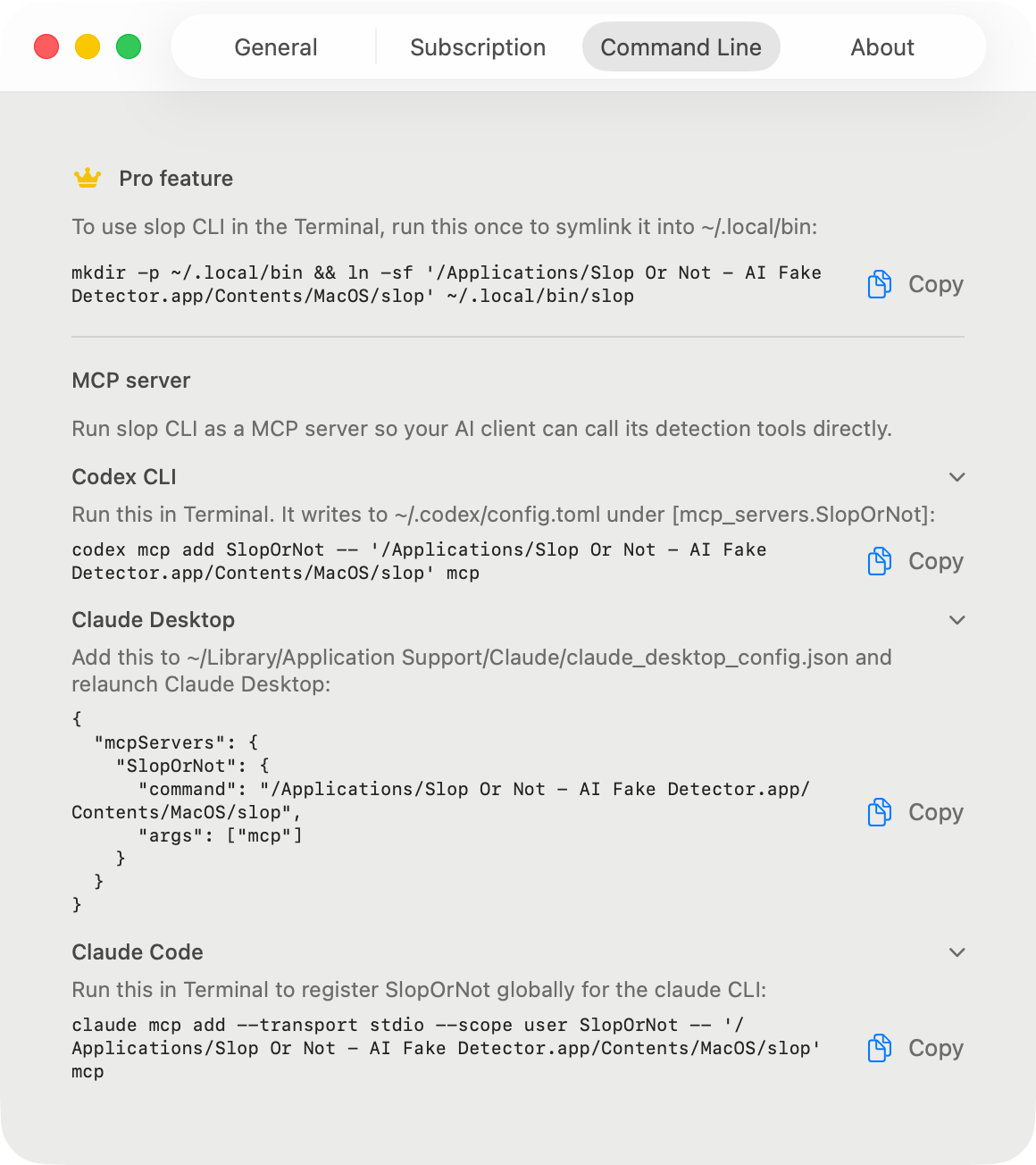
安装 Mac 版 Slop or Not,打开一次,然后激活 Pro。然后运行下面的设置代码块:它将内置的二进制文件链接到 ~/.local/bin,并将该文件夹添加到你的 PATH 中,macOS 不会为你自动完成这一步。设置 > 命令行提供了另一种一行命令,可将应用包本身添加到你的 PATH。使用 slop status 验证。此后,每个新的终端会话都能在 PATH 中找到 slop,无需重新安装。
# One-time setup for zsh, the default shell on macOS.
mkdir -p ~/.local/bin && ln -sf '/Applications/Slop Or Not.app/Contents/MacOS/slop' ~/.local/bin/slop
grep -qsxF 'export PATH="$HOME/.local/bin:$PATH"' ~/.zshrc || printf '\nexport PATH="$HOME/.local/bin:$PATH"\n' >> ~/.zshrc
source ~/.zshrc

slop status --json命令参考
命令范围刻意保持精简:status、text、image、score-image、readability、cleanup 和 MCP。
下面的每个示例都是真实输出,截取自 2026 年 8 月的 Mac 版 Slop or Not 1.1.1,并在标记处进行了删节。
slop status确认 CLI 能找到 app bundle,并报告 Pro 是否已启用。
运行
slop status --json返回
{
  "localCachePro" : true,
  "pro" : true,
  "version" : "1.1.1"
}
slop text从 stdin 读取 UTF-8 文本,并返回与 Mac 应用相同的设备端 AI 概率,以及可读性指标。如果你已经知道语言,可添加 --language。
运行
pbpaste | slop text --json返回
{
  "detectedLanguage" : "en",
  "detection" : {
    "result" : {
      "_0" : 0.12590113,
      "_1" : { "most_likely_real" : {} }
    }
  },
  "inputTruncated" : false,
  "readability" : {
    "detectedLanguage" : "en",
    "languageConfidence" : 0.99984,
    "scores" : [
      { "kind" : "fleschReadingEase", "direction" : "higherIsEasier", "label" : "Fairly difficult", "value" : 50.85 },
      { "kind" : "fleschKincaidGradeLevel", "direction" : "gradeLevel", "value" : 16.97 }
    ],
    "full" : { "consensus" : { … }, "genre" : { … }, "gradeLabel" : { … }, … },
    "selectedLanguage" : "en",
    "stats" : { "wordCount" : 87, "sentenceCount" : 2, "syllableCount" : 115, … },
    "warnings" : [ … ]
  },
  "sentenceCount" : 2
}
slop readability英语采用 Flesch Reading Ease 和 Flesch-Kincaid Grade Level,并在完整报告中包含 Gunning Fog、Coleman-Liau 和 ARI,并给出剔除异常值后的共识等级。德语、西班牙语、意大利语、瑞典语、丹麦语和挪威语各自使用其既定公式。
运行
cat draft.md | slop readability --json返回
{
  "readability" : {
    "detectedLanguage" : "en",
    "languageConfidence" : 0.99984,
    "scores" : [
      { "kind" : "fleschReadingEase", "direction" : "higherIsEasier", "label" : "Fairly difficult", "value" : 50.85 },
      { "kind" : "fleschKincaidGradeLevel", "direction" : "gradeLevel", "value" : 16.97 }
    ],
    "full" : { "consensus" : { … }, "genre" : { … }, "gradeLabel" : { … }, … },
    "selectedLanguage" : "en",
    "stats" : { "wordCount" : 87, "sentenceCount" : 2, "syllableCount" : 115, … },
    "warnings" : [ … ]
  }
}
slop cleanup这是一个查找表,而不是重写:去除零宽字符、同形字和花哨标点,而不改动你的文字。添加 --british 可将美式拼写转换为英式英语。
运行
pbpaste | slop cleanup --json返回
{
  "britishMappings" : [],
  "cleanedText" : "He said \"hello\" - and left.",
  "detectedLanguage" : "en",
  "homoglyphCounts" : [],
  "invisibleCounts" : [
    { "count" : 1, "kind" : "Zero Width Space (U+200B)" }
  ],
  "punctuationCounts" : [
    { "count" : 1, "kind" : "Em Dash (U+2014) with '-'" },
    { "count" : 1, "kind" : "Left Double Quotation Mark (U+201C) with '\"'" },
    { "count" : 1, "kind" : "Right Double Quotation Mark (U+201D) with '\"'" }
  ]
}
slop image在本地检查通过管道传入的 JPEG、PNG、HEIC 或 WebP 图像字节。添加 --ocr 可读取截图中的文字。
运行
slop image --json < ~/Desktop/screenshot.png返回
{
  "detection" : {
    "result" : {
      "_0" : 0.8416403,
      "_1" : { "most_likely_ai_slop" : {} }
    }
  },
  "detectionSourceRaw" : "ml"
}
slop score-image将通过管道传入的图像直接交给模型并获得其原始评分,跳过来源启发式检查。当图像生成循环需要直接获得模型反馈时非常有用。需要安装 AI 图像检测模型。
运行
slop score-image --json < ~/Desktop/generated.png返回
{
  "rawSlopScore" : 0.706787109375
}
slop mcp运行 stdio 服务器,向 Claude、Codex、Cursor 和其他 MCP 客户端公开全部六个工具。使用 --print-config 打印可直接粘贴的设置片段,而无需启动服务器。
运行
slop mcp --print-config返回
CLIENT SETUP
------------
To use slop CLI in the Terminal, run this once to symlink it
into ~/.local/bin:

  mkdir -p ~/.local/bin && ln -sf '/Applications/Slop Or Not.app/Contents/MacOS/slop' ~/.local/bin/slop

MCP SERVER
----------
Run slop CLI as a MCP server so your AI client can call its
detection tools directly. …
(snippets for Claude Desktop, Claude Code, Codex CLI, and Cursor follow)
快捷路径
这些是大多数人最先会用的命令。每个命令都会读取本地输入,并打印本地结果。
复制一段草稿,通过管道传入 slop text,然后读取 JSON 判定。当其他工具需要稳定输出时,添加 --json。
pbpaste | slop text --json可读性检查独立于 AI 检测。当你需要阅读难度检查,又不想把文本发送到网页工具时,可以使用它。
cat draft.md | slop readability --jsonText Cleanup 会去除不可见字符、同形异义字符和间距技巧。它不会重写文本。
pbpaste | slop cleanup --json当图片生成工作流需要原始模型信号,而不是包含来源判断的图片检测结果时,请使用 score-image。
slop score-image --json < ~/Desktop/generated.png通过管道传入截图、产品照片、约会资料照片以及你想在本地检查的其他文件。
slop image --json < ~/Desktop/screenshot.png本地 AI 检测 API
用于本地自动化时,可以。CLI 会读取 stdin 或本地文件并返回 JSON,因此脚本和编辑器可以把它当作本地 AI 检测 API 使用,无需将文本或图片上传到云端端点。它不是托管的 HTTP API;Mac app 会在调用命令的那台机器上运行检测。
pbpaste | slop text --json
slop image --json < ~/Desktop/source-photo.png
slop score-image --json < ~/Desktop/generated.png
通过 CLI 使用 MCP
MCP 服务器是一个 CLI 子命令。当你的 MCP 客户端要求填写命令,或你正在调试设置时,可以直接运行它。
slop mcp帮助我们了解这个网站的使用情况。 隐私政策