

slop status檢查安裝狀態
確認 CLI 能找到 app bundle,並回報 Pro 是否已啟用。
查看指令與回應
執行
slop status --json回傳
{
"localCachePro" : true,
"pro" : true,
"version" : "1.1.1"
}Terminal 中的裝置端檢查
slop CLI 會從你的 Mac 終端機執行 Slop or Not 的 AI 文字偵測器和 AI 圖片偵測器。它會為 Claude、Codex、Hermes Agent、OpenClaw、Cursor、腳本和編輯器回傳 JSON,也涵蓋原始圖片模型評分、可讀性和文字清理。
正在從 ZeroGPT 或 GPTZero 這類雲端偵測器轉過來?把草稿、螢幕截圖或本機檔案用 pipe 傳入。Slop or Not 會在本機評分,而且絕不會上傳。


設定
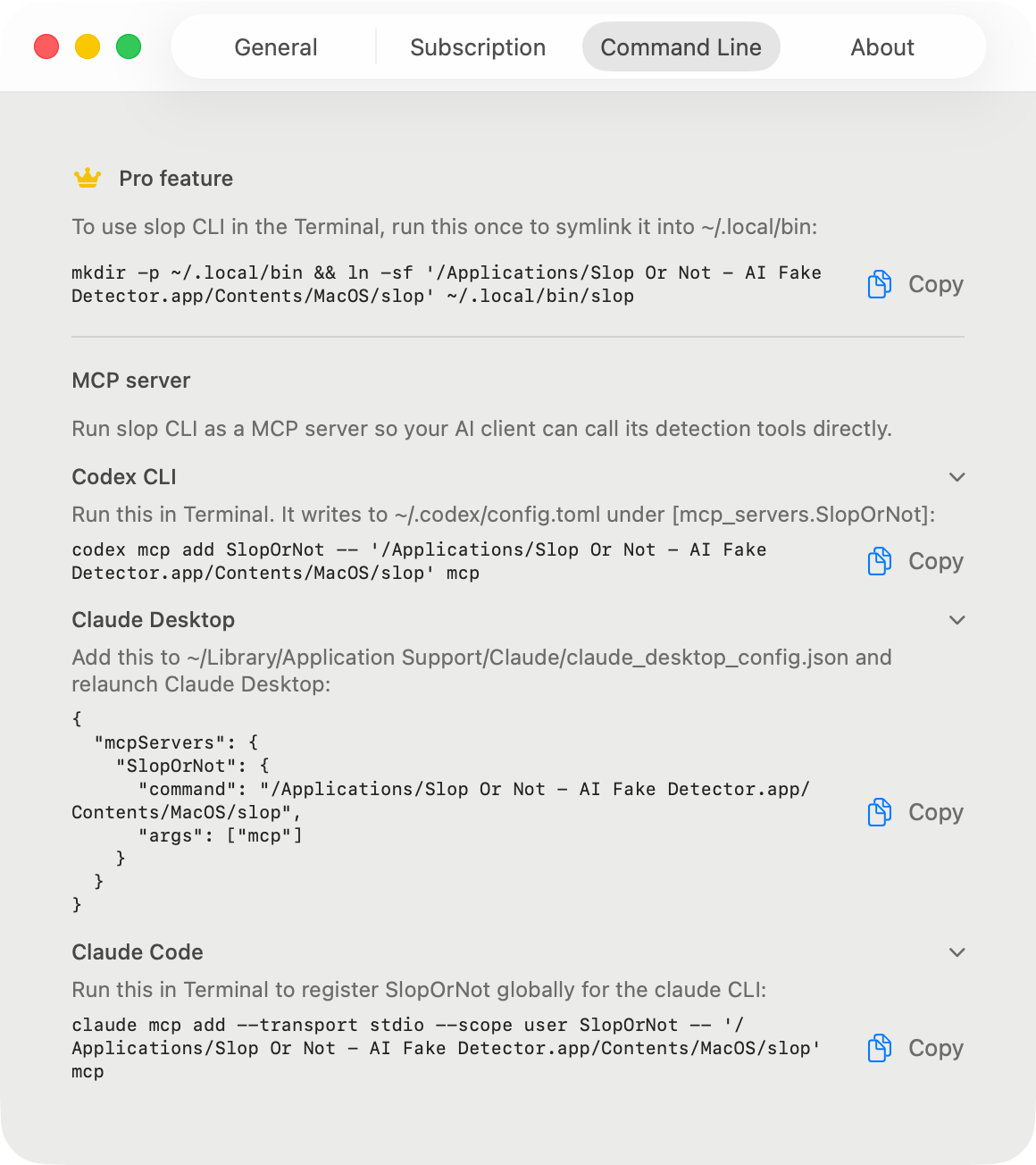
在 Mac 安裝 Slop or Not,打開一次,然後啟用 Pro。接著執行下方設定區塊:它會將隨附的二進位檔連結至 ~/.local/bin,並將該資料夾加入你的 PATH,macOS 不會自動幫你做這件事。設定 > 命令列提供另一種一行指令,可將 App 套件本身加入你的 PATH。使用 slop status 驗證。從現在起,每個新的終端機工作階段都能在 PATH 找到 slop,不必重新安裝。
# One-time setup for zsh, the default shell on macOS.
mkdir -p ~/.local/bin && ln -sf '/Applications/Slop Or Not.app/Contents/MacOS/slop' ~/.local/bin/slop
grep -qsxF 'export PATH="$HOME/.local/bin:$PATH"' ~/.zshrc || printf '\nexport PATH="$HOME/.local/bin:$PATH"\n' >> ~/.zshrc
source ~/.zshrc

slop status --json指令參考
命令介面刻意保持精簡:status、text、image、score-image、readability、cleanup 和 MCP。
以下每個範例都是真實輸出,擷取自 2026 年 8 月的 Mac 版 Slop or Not 1.1.1,並在標示處加以刪節。
slop status確認 CLI 能找到 app bundle,並回報 Pro 是否已啟用。
執行
slop status --json回傳
{
  "localCachePro" : true,
  "pro" : true,
  "version" : "1.1.1"
}
slop text從 stdin 讀取 UTF-8 文字,傳回與 Mac App 顯示相同的本機 AI 機率,以及可讀性指標。若你已知語言,請加上 --language。
執行
pbpaste | slop text --json回傳
{
  "detectedLanguage" : "en",
  "detection" : {
    "result" : {
      "_0" : 0.12590113,
      "_1" : { "most_likely_real" : {} }
    }
  },
  "inputTruncated" : false,
  "readability" : {
    "detectedLanguage" : "en",
    "languageConfidence" : 0.99984,
    "scores" : [
      { "kind" : "fleschReadingEase", "direction" : "higherIsEasier", "label" : "Fairly difficult", "value" : 50.85 },
      { "kind" : "fleschKincaidGradeLevel", "direction" : "gradeLevel", "value" : 16.97 }
    ],
    "full" : { "consensus" : { … }, "genre" : { … }, "gradeLabel" : { … }, … },
    "selectedLanguage" : "en",
    "stats" : { "wordCount" : 87, "sentenceCount" : 2, "syllableCount" : 115, … },
    "warnings" : [ … ]
  },
  "sentenceCount" : 2
}
slop readability英文會取得 Flesch Reading Ease 與 Flesch-Kincaid Grade Level,完整報告還包含 Gunning Fog、Coleman-Liau 和 ARI,並以排除離群值的共識等級呈現。德文、西班牙文、義大利文、瑞典文、丹麥文和挪威文則各自使用其既定公式。
執行
cat draft.md | slop readability --json回傳
{
  "readability" : {
    "detectedLanguage" : "en",
    "languageConfidence" : 0.99984,
    "scores" : [
      { "kind" : "fleschReadingEase", "direction" : "higherIsEasier", "label" : "Fairly difficult", "value" : 50.85 },
      { "kind" : "fleschKincaidGradeLevel", "direction" : "gradeLevel", "value" : 16.97 }
    ],
    "full" : { "consensus" : { … }, "genre" : { … }, "gradeLabel" : { … }, … },
    "selectedLanguage" : "en",
    "stats" : { "wordCount" : 87, "sentenceCount" : 2, "syllableCount" : 115, … },
    "warnings" : [ … ]
  }
}
slop cleanup這是一張查詢表,並非改寫:移除零寬字元、同形字和裝飾性標點符號,不會改動你的文字。若要將美式拼字轉換為英式英文,請加上 --british。
執行
pbpaste | slop cleanup --json回傳
{
  "britishMappings" : [],
  "cleanedText" : "He said \"hello\" - and left.",
  "detectedLanguage" : "en",
  "homoglyphCounts" : [],
  "invisibleCounts" : [
    { "count" : 1, "kind" : "Zero Width Space (U+200B)" }
  ],
  "punctuationCounts" : [
    { "count" : 1, "kind" : "Em Dash (U+2014) with '-'" },
    { "count" : 1, "kind" : "Left Double Quotation Mark (U+201C) with '\"'" },
    { "count" : 1, "kind" : "Right Double Quotation Mark (U+201D) with '\"'" }
  ]
}
slop image在本機檢查透過管道傳入的 JPEG、PNG、HEIC 或 WebP 影像位元組。若要讀取截圖中的文字,請加上 --ocr。
執行
slop image --json < ~/Desktop/screenshot.png回傳
{
  "detection" : {
    "result" : {
      "_0" : 0.8416403,
      "_1" : { "most_likely_ai_slop" : {} }
    }
  },
  "detectionSourceRaw" : "ml"
}
slop score-image將管線傳入的圖片直接交給模型以取得原始評分,跳過來源啟發式判斷。當圖片生成迴圈需要直接模型回饋時很有用。需安裝 AI 圖片偵測模型。
執行
slop score-image --json < ~/Desktop/generated.png回傳
{
  "rawSlopScore" : 0.706787109375
}
slop mcp執行 stdio 伺服器,將全部六個工具公開給 Claude、Codex、Cursor 及其他 MCP 用戶端使用。使用 --print-config 可列印可立即貼上的設定片段,而不啟動伺服器。
執行
slop mcp --print-config回傳
CLIENT SETUP
------------
To use slop CLI in the Terminal, run this once to symlink it
into ~/.local/bin:

  mkdir -p ~/.local/bin && ln -sf '/Applications/Slop Or Not.app/Contents/MacOS/slop' ~/.local/bin/slop

MCP SERVER
----------
Run slop CLI as a MCP server so your AI client can call its
detection tools directly. …
(snippets for Claude Desktop, Claude Code, Codex CLI, and Cursor follow)
快速用法
這些是大多數人最先會用到的指令。每個指令都會讀取本機輸入並印出本機結果。
複製草稿,pipe 到 slop text,然後讀取 JSON 判定。當另一個工具需要穩定輸出時,請加上 --json。
pbpaste | slop text --json可讀性和 AI 偵測是分開的。當你需要檢查閱讀難度,又不想把文字送到網頁工具時,請使用它。
cat draft.md | slop readability --jsonText Cleanup 會移除不可見字元、同形異義字和空白技巧。它不會改寫文字。
pbpaste | slop cleanup --json當圖片生成工作流程需要原始模型訊號,而不是具來源判斷的圖片偵測結果時,請使用 score-image。
slop score-image --json < ~/Desktop/generated.png透過管道傳入截圖、產品照、交友檔案照片,以及其他你想在本機檢查的檔案。
slop image --json < ~/Desktop/screenshot.png本機 AI 偵測器 API
用於本機自動化的話,可以。CLI 會讀取 stdin 或本機檔案並回傳 JSON,因此腳本和編輯器可以把它當成本機 AI 偵測器 API 使用,不必將文字或圖片上傳到雲端端點。它不是託管式 HTTP API;Mac app 會在呼叫指令的那台機器上執行檢查。
pbpaste | slop text --json
slop image --json < ~/Desktop/source-photo.png
slop score-image --json < ~/Desktop/generated.png
從 CLI 使用 MCP
MCP server 是 CLI 的子指令。當你的 MCP client 要求提供指令,或你正在偵錯設定時,可以直接執行它。
slop mcp協助我們了解此網站的使用方式。 隱私權政策