

slop statusインストールを確認
CLIがアプリバンドルを見つけられることを確認し、Proが有効かどうかを報告します。
コマンドとレスポンスを表示
実行
slop status --json戻り値
{
"localCachePro" : true,
"pro" : true,
"version" : "1.1.1"
}Terminalでオンデバイスチェック
slop CLI は、Macのターミナルから Slop or Not のAIテキスト検出器とAI画像検出器を実行します。Claude、Codex、Hermes Agent、OpenClaw、Cursor、スクリプト、エディタ向けにJSONを返し、生の画像モデルスコアリング、読みやすさ、テキストクリーンアップにも対応します。
ZeroGPTやGPTZeroのようなクラウド検出ツールから移行しますか? 下書き、スクリーンショット、ローカルファイルをパイプで渡せます。Slop or Notはローカルでスコアリングし、アップロードはしません。


設定
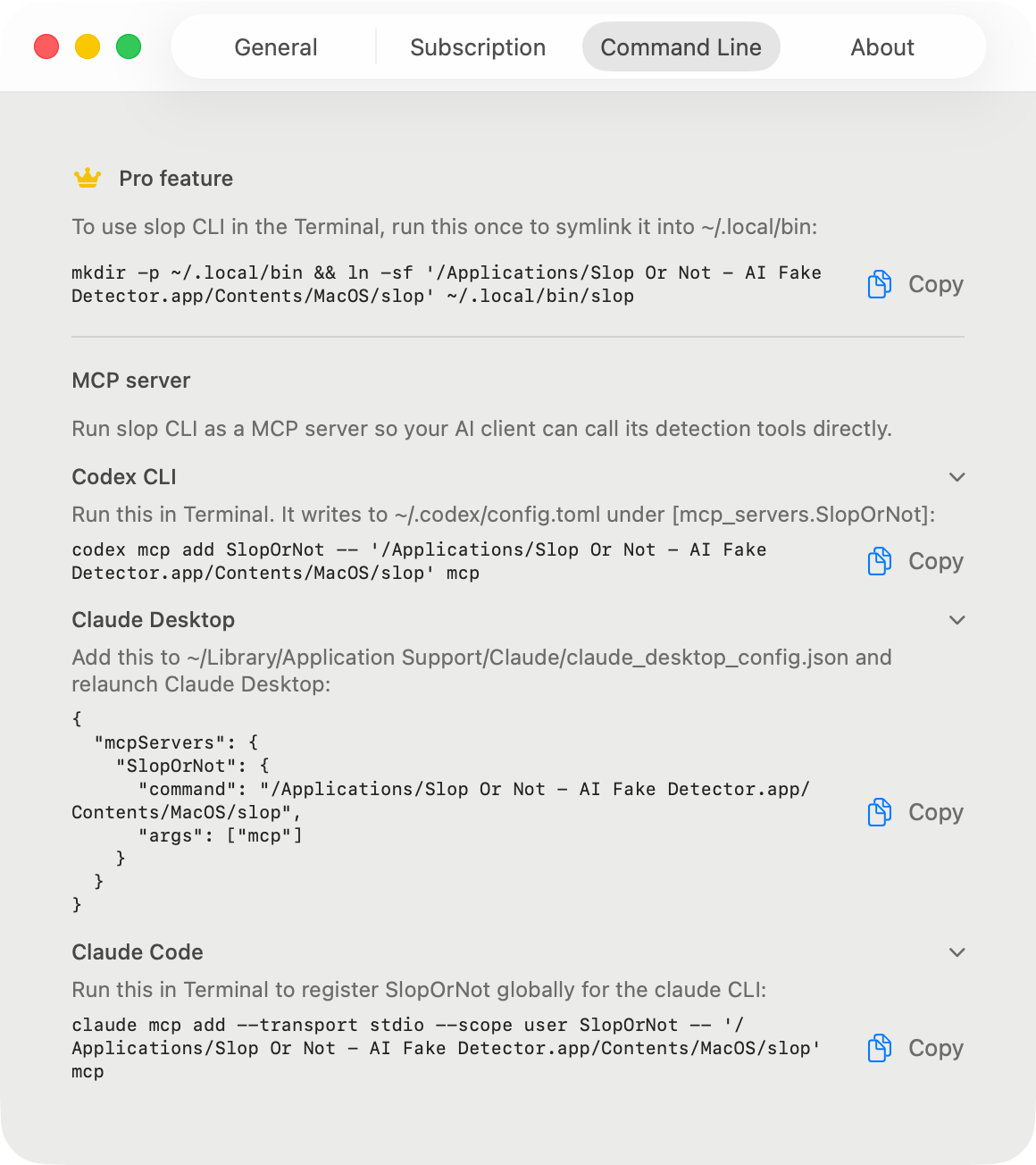
Slop or Not for Macをインストールし、一度開いてProを有効化します。次に、以下のセットアップブロックを実行してください。バンドルされたバイナリを~/.local/binにリンクし、そのフォルダをPATHに追加します。macOSはこれを自動では行いません。Settings > Command Lineには、アプリバンドル自体をPATHに追加する別のワンライナーがあります。slop statusで確認してください。以後、新しいTerminalセッションでは再インストールなしでPATH上のslopが見つかります。
# One-time setup for zsh, the default shell on macOS.
mkdir -p ~/.local/bin && ln -sf '/Applications/Slop Or Not.app/Contents/MacOS/slop' ~/.local/bin/slop
grep -qsxF 'export PATH="$HOME/.local/bin:$PATH"' ~/.zshrc || printf '\nexport PATH="$HOME/.local/bin:$PATH"\n' >> ~/.zshrc
source ~/.zshrc

slop status --jsonコマンドリファレンス
コマンドは意図的に少なくしています: status、text、image、score-image、readability、cleanup、MCP。
下の例はすべて、2026年8月に Slop or Not 1.1.1 for Mac から取得した実際の出力です。明記されている箇所は省略しています。
slop statusCLIがアプリバンドルを見つけられることを確認し、Proが有効かどうかを報告します。
実行
slop status --json戻り値
{
  "localCachePro" : true,
  "pro" : true,
  "version" : "1.1.1"
}
slop textstdin から UTF-8 テキストを読み込み、Mac アプリに表示されるものと同じオンデバイスの AI 確率に加えて、読みやすさの指標を返します。言語が分かっている場合は --language を追加してください。
実行
pbpaste | slop text --json戻り値
{
  "detectedLanguage" : "en",
  "detection" : {
    "result" : {
      "_0" : 0.12590113,
      "_1" : { "most_likely_real" : {} }
    }
  },
  "inputTruncated" : false,
  "readability" : {
    "detectedLanguage" : "en",
    "languageConfidence" : 0.99984,
    "scores" : [
      { "kind" : "fleschReadingEase", "direction" : "higherIsEasier", "label" : "Fairly difficult", "value" : 50.85 },
      { "kind" : "fleschKincaidGradeLevel", "direction" : "gradeLevel", "value" : 16.97 }
    ],
    "full" : { "consensus" : { … }, "genre" : { … }, "gradeLabel" : { … }, … },
    "selectedLanguage" : "en",
    "stats" : { "wordCount" : 87, "sentenceCount" : 2, "syllableCount" : 115, … },
    "warnings" : [ … ]
  },
  "sentenceCount" : 2
}
slop readability英語では Flesch Reading Ease と Flesch-Kincaid Grade Level に加え、完全なレポートでは Gunning Fog、Coleman-Liau、ARI も表示され、外れ値を除いた合意グレードも返します。ドイツ語、スペイン語、イタリア語、スウェーデン語、デンマーク語、ノルウェー語では、それぞれ定着している算式を使います。
実行
cat draft.md | slop readability --json戻り値
{
  "readability" : {
    "detectedLanguage" : "en",
    "languageConfidence" : 0.99984,
    "scores" : [
      { "kind" : "fleschReadingEase", "direction" : "higherIsEasier", "label" : "Fairly difficult", "value" : 50.85 },
      { "kind" : "fleschKincaidGradeLevel", "direction" : "gradeLevel", "value" : 16.97 }
    ],
    "full" : { "consensus" : { … }, "genre" : { … }, "gradeLabel" : { … }, … },
    "selectedLanguage" : "en",
    "stats" : { "wordCount" : 87, "sentenceCount" : 2, "syllableCount" : 115, … },
    "warnings" : [ … ]
  }
}
slop cleanup書き換えではなく、ルックアップテーブルです。本文には触れず、ゼロ幅文字、ホモグリフ、装飾的な句読点を取り除きます。アメリカ英語の綴りをイギリス英語に変換するには --british を追加してください。
実行
pbpaste | slop cleanup --json戻り値
{
  "britishMappings" : [],
  "cleanedText" : "He said \"hello\" - and left.",
  "detectedLanguage" : "en",
  "homoglyphCounts" : [],
  "invisibleCounts" : [
    { "count" : 1, "kind" : "Zero Width Space (U+200B)" }
  ],
  "punctuationCounts" : [
    { "count" : 1, "kind" : "Em Dash (U+2014) with '-'" },
    { "count" : 1, "kind" : "Left Double Quotation Mark (U+201C) with '\"'" },
    { "count" : 1, "kind" : "Right Double Quotation Mark (U+201D) with '\"'" }
  ]
}
slop imageパイプされた JPEG、PNG、HEIC、WebP の画像バイトをローカルでチェックします。スクリーンショット内の文字を読み取るには --ocr を追加してください。
実行
slop image --json < ~/Desktop/screenshot.png戻り値
{
  "detection" : {
    "result" : {
      "_0" : 0.8416403,
      "_1" : { "most_likely_ai_slop" : {} }
    }
  },
  "detectionSourceRaw" : "ml"
}
slop score-imageパイプで渡した画像をそのままモデルに通し、出所に関するヒューリスティックを省いて生のスコアを取得します。画像生成ループでモデルからの直接フィードバックが必要なときに便利です。AI画像検出モデルのインストールが必要です。
実行
slop score-image --json < ~/Desktop/generated.png戻り値
{
  "rawSlopScore" : 0.706787109375
}
slop mcp6つすべてのツールを Claude、Codex、Cursor、その他の MCP クライアントに公開する stdio サーバーを実行します。サーバーを起動する代わりに、そのまま貼り付けられる設定スニペットを出力するには --print-config を使ってください。
実行
slop mcp --print-config戻り値
CLIENT SETUP
------------
To use slop CLI in the Terminal, run this once to symlink it
into ~/.local/bin:

  mkdir -p ~/.local/bin && ln -sf '/Applications/Slop Or Not.app/Contents/MacOS/slop' ~/.local/bin/slop

MCP SERVER
----------
Run slop CLI as a MCP server so your AI client can call its
detection tools directly. …
(snippets for Claude Desktop, Claude Code, Codex CLI, and Cursor follow)
近道
多くの人が最初に使うコマンドです。どれもローカル入力を読み取り、ローカル結果を出力します。
下書きをコピーしてslop textにパイプし、JSONの判定を読みます。別のツールが安定した出力を必要とするときは--jsonを追加します。
pbpaste | slop text --json読みやすさはAI検出とは別です。テキストをWebツールに送らずに読解レベルを確認したいときに使います。
cat draft.md | slop readability --jsonText Cleanupは、見えない文字、ホモグリフ、スペースの細工を取り除きます。テキストの書き換えは行いません。
pbpaste | slop cleanup --json画像生成ワークフローで、来歴を考慮した画像検出結果ではなくモデルの生シグナルが必要な場合は、score-imageを使用します。
slop score-image --json < ~/Desktop/generated.pngスクリーンショット、商品写真、マッチングアプリのプロフィール写真など、ローカルでチェックしたいファイルをパイプしてください。
slop image --json < ~/Desktop/screenshot.pngローカルAI検出API
ローカルでの自動化なら、はい。CLIはstdinまたはローカルファイルを読み込み、JSONを返します。そのため、スクリプトやエディタは、テキストや画像をクラウドエンドポイントへアップロードせずに、ローカルAI検出APIのように扱えます。これはホスト型のHTTP APIではありません。Macアプリが、コマンドを呼び出したマシン上でチェックを実行します。
pbpaste | slop text --json
slop image --json < ~/Desktop/source-photo.png
slop score-image --json < ~/Desktop/generated.png
CLIからMCP
MCPサーバーはCLIのサブコマンドです。MCPクライアントがコマンドを求めたとき、または設定をデバッグするときに直接実行します。
slop mcpこのサイトの利用状況の把握にご協力ください。 プライバシーポリシー