

slop_status檢查 app 與 Pro 狀態
在代理開始工作流程前,確認 app 已安裝、二進位檔可執行,且 Pro 已啟用。
查看 payload 與結果
工具輸入
{}結果形狀
{
"pro": true,
"version": "1.1.1"
}裝置端 AI 偵測器評分
Slop or Not MCP server 可讓 Claude、Codex、Hermes Agent、OpenClaw、Cursor 和其他代理在你的 Mac 上呼叫本機 AI 文字偵測器、AI 圖片偵測器、可讀性分析器和清理工具。
將你的 MCP 用戶端指向內建的 slop mcp 指令。使用 Pro 時,Claude、Codex、Hermes Agent、OpenClaw、Cursor 和其他代理程式可以持續執行本機檢查,不需要按每次呼叫計算 API 用量。


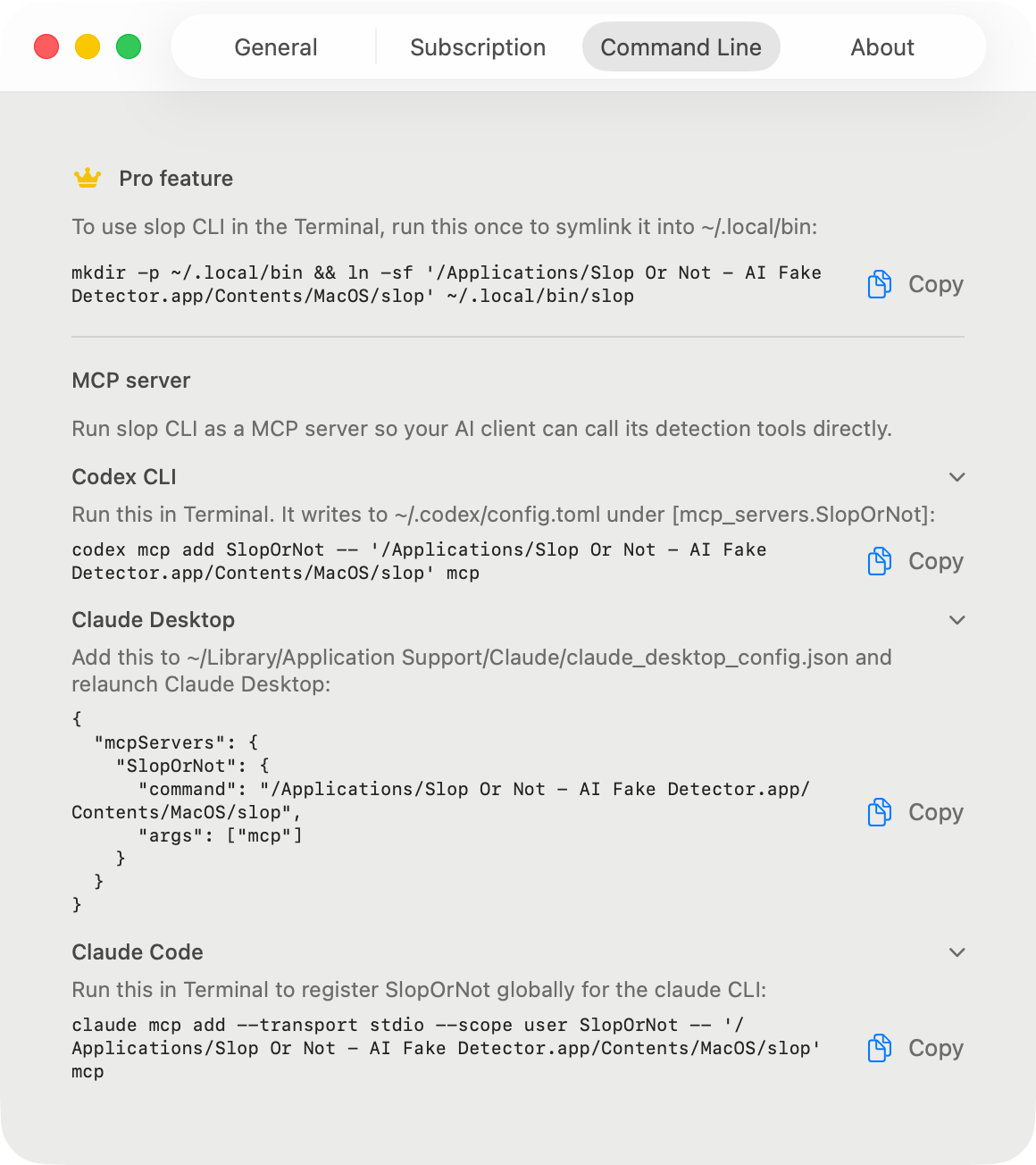
client 設定
安裝 Mac App、啟用 Pro,然後為你的用戶端使用 App 套件片段。Claude、Codex、Hermes Agent、OpenClaw 和 Cursor 全都指向同一個本機伺服器。設定一次,之後每個代理程式工作階段都會重複使用,不需要重新安裝,也不需要重新登入。
claude mcp add --transport stdio --scope user SlopOrNot -- "/Applications/Slop Or Not.app/Contents/MacOS/slop" mcp{
"mcpServers": {
"SlopOrNot": {
"command": "/Applications/Slop Or Not.app/Contents/MacOS/slop",
"args": ["mcp"]
}
}
}codex mcp add SlopOrNot -- '/Applications/Slop Or Not.app/Contents/MacOS/slop' mcp偏好直接編輯檔案?請改為將以下內容加入 ~/.codex/config.toml:
[mcp_servers.SlopOrNot]
command = "/Applications/Slop Or Not.app/Contents/MacOS/slop"
args = ["mcp"]mcp_servers:
SlopOrNot:
command: "/Applications/Slop Or Not.app/Contents/MacOS/slop"
args: ["mcp"]openclaw mcp set slopornot '{"command":"/Applications/Slop Or Not.app/Contents/MacOS/slop","args":["mcp"]}'
openclaw mcp doctor slopornot --probe{
"mcpServers": {
"SlopOrNot": {
"command": "/Applications/Slop Or Not.app/Contents/MacOS/slop",
"args": ["mcp"]
}
}
}工具參考
伺服器提供代理程式通常需要的六種檢查工具:狀態、文字偵測、可讀性、清理、圖片偵測,以及原始圖片評分。
以下每個範例都是真實輸出,擷取自 2026 年 8 月的 Mac 版 Slop or Not 1.1.1,並在標示處加以刪節。
slop_status在代理開始工作流程前,確認 app 已安裝、二進位檔可執行,且 Pro 已啟用。
工具輸入
{}結果形狀
{
  "pro": true,
  "version": "1.1.1"
}detect_text使用本機 AI 文字偵測模型為一段文字評分,並傳回判定、分數、語言、句子數和可讀性指標。
工具輸入
{
  "text": "<text>",
  "include_readability": true,
  "language_code": "en",
  "locale": "en-US"
}
結果形狀
{
  "kind": "result",
  "verdict": "most_likely_real",
  "score": 0.1259,
  "language": "en",
  "sentence_count": 2,
  "generator": null,
  "input_truncated": false,
  "readability": {
    "language": "en",
    "language_confidence": 0.9998,
    "scores": [
      { "kind": "fleschReadingEase", "value": 50.85, "label": "Fairly difficult", … },
      { "kind": "fleschKincaidGradeLevel", "value": 16.97, … }
    ],
    "word_count": 87,
    "sentence_count": 2,
    "avg_words_per_sentence": 43.5,
    "warnings": [ … ],
    "full": { "consensus": { … }, "genre": { … }, "grade_label": { … }, … }
  }
}analyze_readability計算閱讀難度指標,不執行 AI 偵測。
工具輸入
{
  "text": "<text>",
  "language_code": "en",
  "locale": "en-US"
}
結果形狀
{
  "language": "en",
  "language_confidence": 0.9998,
  "scores": [
    { "kind": "fleschReadingEase", "value": 50.85, "label": "Fairly difficult", … },
    { "kind": "fleschKincaidGradeLevel", "value": 16.97, … }
  ],
  "avg_words_per_sentence": 43.5,
  "sentence_count": 2,
  "word_count": 87,
  "warnings": [ … ],
  "full": { "consensus": { … }, "genre": { … }, "grade_label": { … }, … }
}clean_text在下一次偵測前,移除零寬字元、同形異義字和花俏標點。
工具輸入
{
  "text": "<text>",
  "language_code": "en",
  "remove_invisibles": true,
  "remove_punctuation": true,
  "remove_homoglyphs": true,
  "britishize": false
}
結果形狀
{
  "cleaned_text": "He said \"hello\" - and left.",
  "language": "en",
  "removed_invisibles": 1,
  "punctuation_replacements": 3,
  "homoglyphs_replaced": 0,
  "british_substitutions": 0
}detect_image在本機使用 C2PA 與 IPTC 來源讀取,以及本機模型備援,檢查 JPEG、PNG、HEIC 或 WebP 影像位元組。結果會標明其 detection_source,因此代理程式可以分辨來源命中與模型分數。
工具輸入
{
  "image_base64": "<base64>",
  "recognize_text": false
}
結果形狀
{
  "kind": "result",
  "verdict": "probably_ai_slop",
  "score": 0.6429,
  "generator": null,
  "detection_source": "ml",
  "watermark_provider": null,
  "watermark_confidence": null,
  "recognized_text": null,
  "recognized_sentence_count": null
}score_image回傳原始圖片模型評分,不含完整的來源感知圖片偵測回應。需安裝 AI 圖片偵測模型。
工具輸入
{
  "image_base64": "<base64>"
}
結果形狀
{
  "raw_slop_score": 0.33984375
}
驗證
重新啟動後,請要求你的代理程式執行 slop_status。預期結果是一個工具呼叫,能回報本機 App 與 Pro 狀態且無錯誤。需要 Pro 的呼叫會以工具錯誤 (isError: true) 傳回,而伺服器會繼續運作,因此一次被封鎖的呼叫不會結束整個工作階段。
{
  "pro": true,
  "version": "1.1.1"
}疑難排解
GUI 代理程式可能會在你的登入 shell 之外啟動,導致指令名稱無法解析。這些片段使用已簽署的 app-bundle 路徑,讓每個用戶端都啟動同一個內建的 Slop or Not binary。
本機 API
可以,用於代理工作流程。MCP 讓 Claude、Codex、Hermes Agent、OpenClaw、Cursor 和其他 client 取得本機工具介面,而不是使用託管的 AI 偵測 API。client 會透過 stdio 將文字或圖片資料送到內建 Mac 二進位檔,檢查會在你的 Mac 上執行。
搭配代理循環使用
agentic AI Humanizer skill 不需要 Slop or Not 也能執行核心改寫和語氣匹配。當你想讓 MCP tools 對基準版本評分、在人性化前後執行 Text Cleanup、用裝置端 AI 偵測器重新評分,並顯示清理統計時,請在 Pro 啟用的情況下將它連接到 Slop or Not。你的寫作樣本會引導改寫;Slop or Not 則提供本機 AI 偵測器測量。
Slop or Not 會回傳機率判斷,而非作者的證明。結果可能會因新的 AI 模型、短段落以及經過人類大量編輯的文字而有所不同。
協助我們了解此網站的使用方式。 隱私權政策